
Diffusers documentation
Stable Diffusion XL
Stable Diffusion XL


Stable Diffusion XL (SDXL) was proposed in SDXL: Improving Latent Diffusion Models for High-Resolution Image Synthesis by Dustin Podell, Zion English, Kyle Lacey, Andreas Blattmann, Tim Dockhorn, Jonas Müller, Joe Penna, and Robin Rombach.
The abstract from the paper is:
We present SDXL, a latent diffusion model for text-to-image synthesis. Compared to previous versions of Stable Diffusion, SDXL leverages a three times larger UNet backbone: The increase of model parameters is mainly due to more attention blocks and a larger cross-attention context as SDXL uses a second text encoder. We design multiple novel conditioning schemes and train SDXL on multiple aspect ratios. We also introduce a refinement model which is used to improve the visual fidelity of samples generated by SDXL using a post-hoc image-to-image technique. We demonstrate that SDXL shows drastically improved performance compared the previous versions of Stable Diffusion and achieves results competitive with those of black-box state-of-the-art image generators.
Tips
- Using SDXL with a DPM++ scheduler for less than 50 steps is known to produce visual artifacts because the solver becomes numerically unstable. To fix this issue, take a look at this PR which recommends for ODE/SDE solvers:
- set
use_karras_sigmas=Trueorlu_lambdas=Trueto improve image quality - set
euler_at_final=Trueif you’re using a solver with uniform step sizes (DPM++2M or DPM++2M SDE)
- set
- Most SDXL checkpoints work best with an image size of 1024x1024. Image sizes of 768x768 and 512x512 are also supported, but the results aren’t as good. Anything below 512x512 is not recommended and likely won’t be for default checkpoints like stabilityai/stable-diffusion-xl-base-1.0.
- SDXL can pass a different prompt for each of the text encoders it was trained on. We can even pass different parts of the same prompt to the text encoders.
- SDXL output images can be improved by making use of a refiner model in an image-to-image setting.
- SDXL offers
negative_original_size,negative_crops_coords_top_left, andnegative_target_sizeto negatively condition the model on image resolution and cropping parameters.
Check out the Stability AI Hub organization for the official base and refiner model checkpoints!
Make sure you have the following libraries installed.
# uncomment to install the necessary libraries in Colab
#!pip install -q diffusers transformers accelerate invisible-watermark>=0.2.0
We recommend installing the invisible-watermark library to help identify images that are generated. If the invisible-watermark library is installed, it is used by default. To disable the watermarker:
pipeline = StableDiffusionXLPipeline.from_pretrained(..., add_watermarker=False)
Load model checkpoints
Model weights may be stored in separate subfolders on the Hub or locally, in which case, you should use the from_pretrained() method:
from diffusers import StableDiffusionXLPipeline, StableDiffusionXLImg2ImgPipeline
import torch

pipeline = StableDiffusionXLPipeline.from_pretrained(
    "stabilityai/stable-diffusion-xl-base-1.0", dtype=torch.float16, variant="fp16", use_safetensors=True
).to("cuda")  # or "mps", "xpu", "cpu"

refiner = StableDiffusionXLImg2ImgPipeline.from_pretrained(
    "stabilityai/stable-diffusion-xl-refiner-1.0", dtype=torch.float16, use_safetensors=True, variant="fp16"
).to("cuda")
You can also use the from_single_file() method to load a model checkpoint stored in a single file format (.ckpt or .safetensors) from the Hub or locally:
from diffusers import StableDiffusionXLPipeline, StableDiffusionXLImg2ImgPipeline
import torch

pipeline = StableDiffusionXLPipeline.from_single_file(
    "https://huggingface.co/stabilityai/stable-diffusion-xl-base-1.0/blob/main/sd_xl_base_1.0.safetensors",
    dtype=torch.float16
).to("cuda")  # or "mps", "xpu", "cpu"

refiner = StableDiffusionXLImg2ImgPipeline.from_single_file(
    "https://huggingface.co/stabilityai/stable-diffusion-xl-refiner-1.0/blob/main/sd_xl_refiner_1.0.safetensors", dtype=torch.float16
).to("cuda")
Text-to-image
For text-to-image, pass a text prompt. By default, SDXL generates a 1024x1024 image for the best results. You can try setting the height and width parameters to 768x768 or 512x512, but anything below 512x512 is not likely to work.
from diffusers import AutoPipelineForText2Image
import torch

pipeline_text2image = AutoPipelineForText2Image.from_pretrained(
    "stabilityai/stable-diffusion-xl-base-1.0", dtype=torch.float16, variant="fp16", use_safetensors=True
).to("cuda")  # or "mps", "xpu", "cpu"

prompt = "Astronaut in a jungle, cold color palette, muted colors, detailed, 8k"
image = pipeline_text2image(prompt=prompt).images[0]
image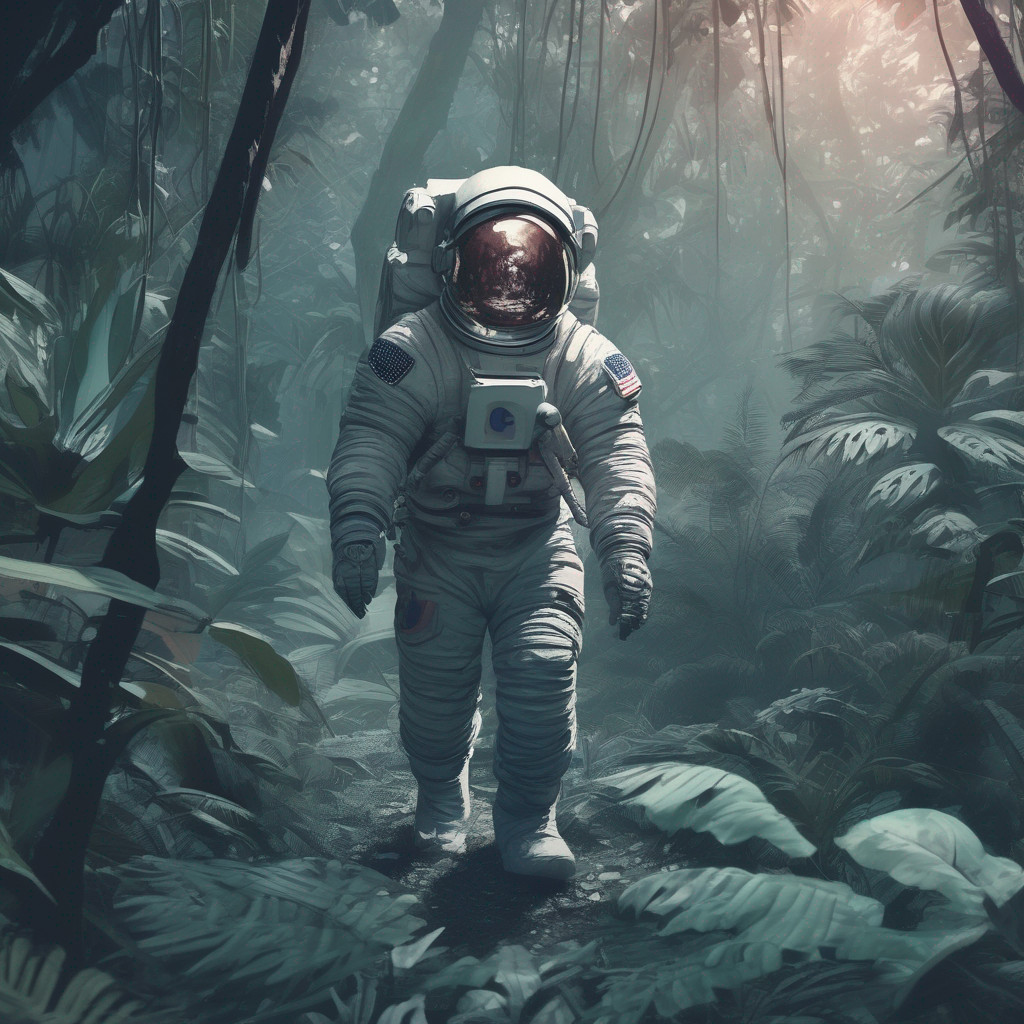
Image-to-image
For image-to-image, SDXL works especially well with image sizes between 768x768 and 1024x1024. Pass an initial image, and a text prompt to condition the image with:
from diffusers import AutoPipelineForImage2Image
from diffusers.utils import load_image, make_image_grid

# use from_pipe to avoid consuming additional memory when loading a checkpoint
pipeline = AutoPipelineForImage2Image.from_pipe(pipeline_text2image).to("cuda")  # or "mps", "xpu", "cpu"

url = "https://huggingface.co/datasets/huggingface/documentation-images/resolve/main/diffusers/sdxl-text2img.png"
init_image = load_image(url)
prompt = "a dog catching a frisbee in the jungle"
image = pipeline(prompt, image=init_image, strength=0.8, guidance_scale=10.5).images[0]
make_image_grid([init_image, image], rows=1, cols=2)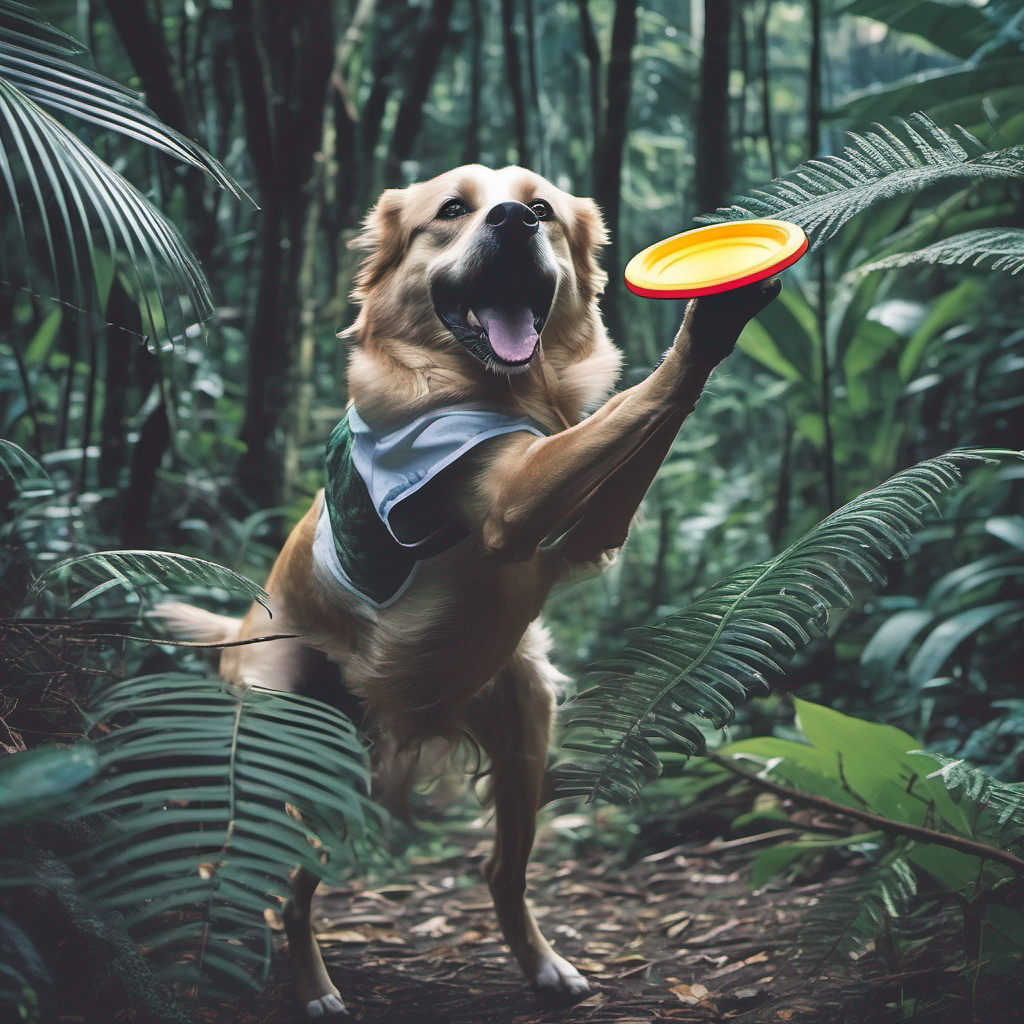
Inpainting
For inpainting, you’ll need the original image and a mask of what you want to replace in the original image. Create a prompt to describe what you want to replace the masked area with.
from diffusers import AutoPipelineForInpainting
from diffusers.utils import load_image, make_image_grid

# use from_pipe to avoid consuming additional memory when loading a checkpoint
pipeline = AutoPipelineForInpainting.from_pipe(pipeline_text2image).to("cuda")  # or "mps", "xpu", "cpu"

img_url = "https://huggingface.co/datasets/huggingface/documentation-images/resolve/main/diffusers/sdxl-text2img.png"
mask_url = "https://huggingface.co/datasets/huggingface/documentation-images/resolve/main/diffusers/sdxl-inpaint-mask.png"

init_image = load_image(img_url)
mask_image = load_image(mask_url)

prompt = "A deep sea diver floating"
image = pipeline(prompt=prompt, image=init_image, mask_image=mask_image, strength=0.85, guidance_scale=12.5).images[0]
make_image_grid([init_image, mask_image, image], rows=1, cols=3)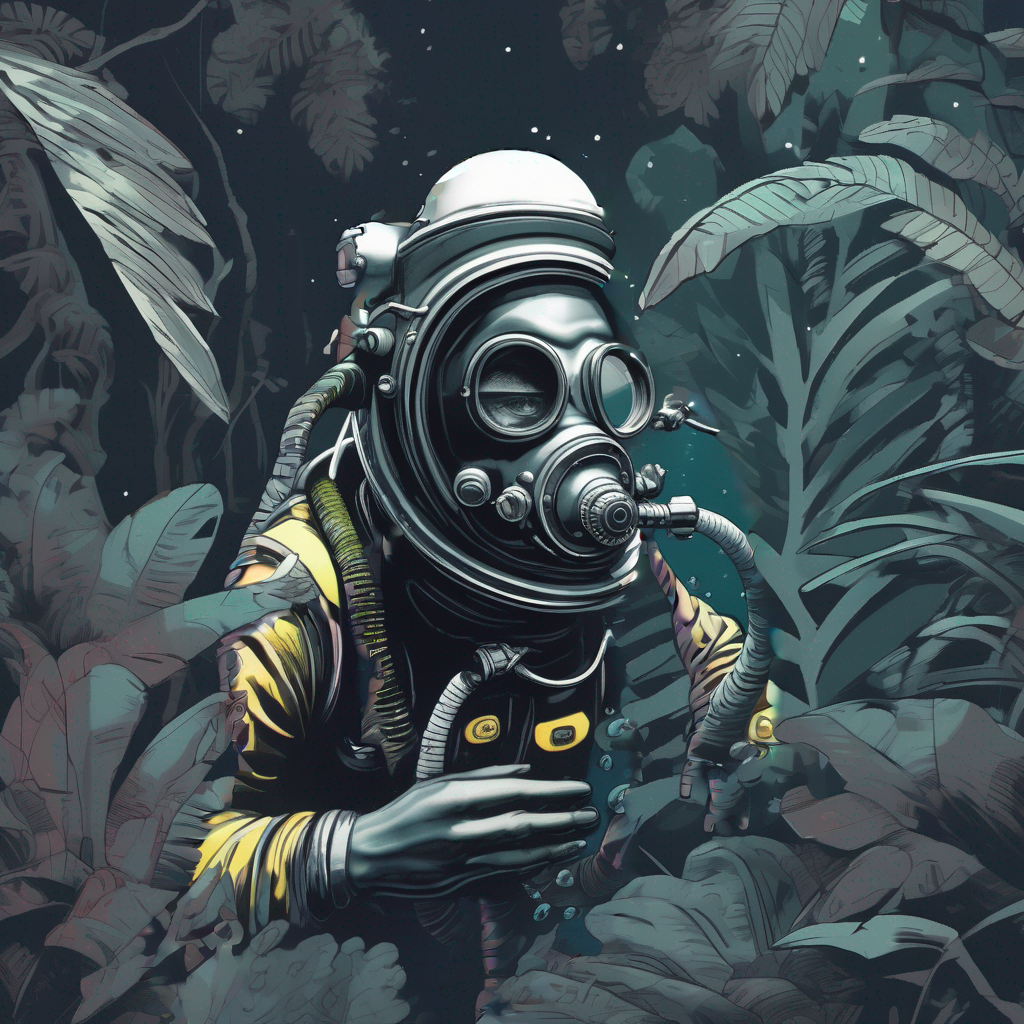
Refine image quality
SDXL includes a refiner model specialized in denoising low-noise stage images to generate higher-quality images from the base model. There are two ways to use the refiner:
- use the base and refiner models together to produce a refined image
- use the base model to produce an image, and subsequently use the refiner model to add more details to the image (this is how SDXL was originally trained)
Base + refiner model
When you use the base and refiner model together to generate an image, this is known as an ensemble of expert denoisers. The ensemble of expert denoisers approach requires fewer overall denoising steps versus passing the base model’s output to the refiner model, so it should be significantly faster to run. However, you won’t be able to inspect the base model’s output because it still contains a large amount of noise.
As an ensemble of expert denoisers, the base model serves as the expert during the high-noise diffusion stage and the refiner model serves as the expert during the low-noise diffusion stage. Load the base and refiner model:
from diffusers import DiffusionPipeline
import torch

base = DiffusionPipeline.from_pretrained(
    "stabilityai/stable-diffusion-xl-base-1.0", dtype=torch.float16, variant="fp16", use_safetensors=True
).to("cuda")  # or "mps", "xpu", "cpu"

refiner = DiffusionPipeline.from_pretrained(
    "stabilityai/stable-diffusion-xl-refiner-1.0",
    text_encoder_2=base.text_encoder_2,
    vae=base.vae,
    dtype=torch.float16,
    use_safetensors=True,
    variant="fp16",
).to("cuda")
To use this approach, you need to define the number of timesteps for each model to run through their respective stages. For the base model, this is controlled by the denoising_end parameter and for the refiner model, it is controlled by the denoising_start parameter.
The
denoising_endanddenoising_startparameters should be a float between 0 and 1. These parameters are represented as a proportion of discrete timesteps as defined by the scheduler. If you’re also using thestrengthparameter, it’ll be ignored because the number of denoising steps is determined by the discrete timesteps the model is trained on and the declared fractional cutoff.
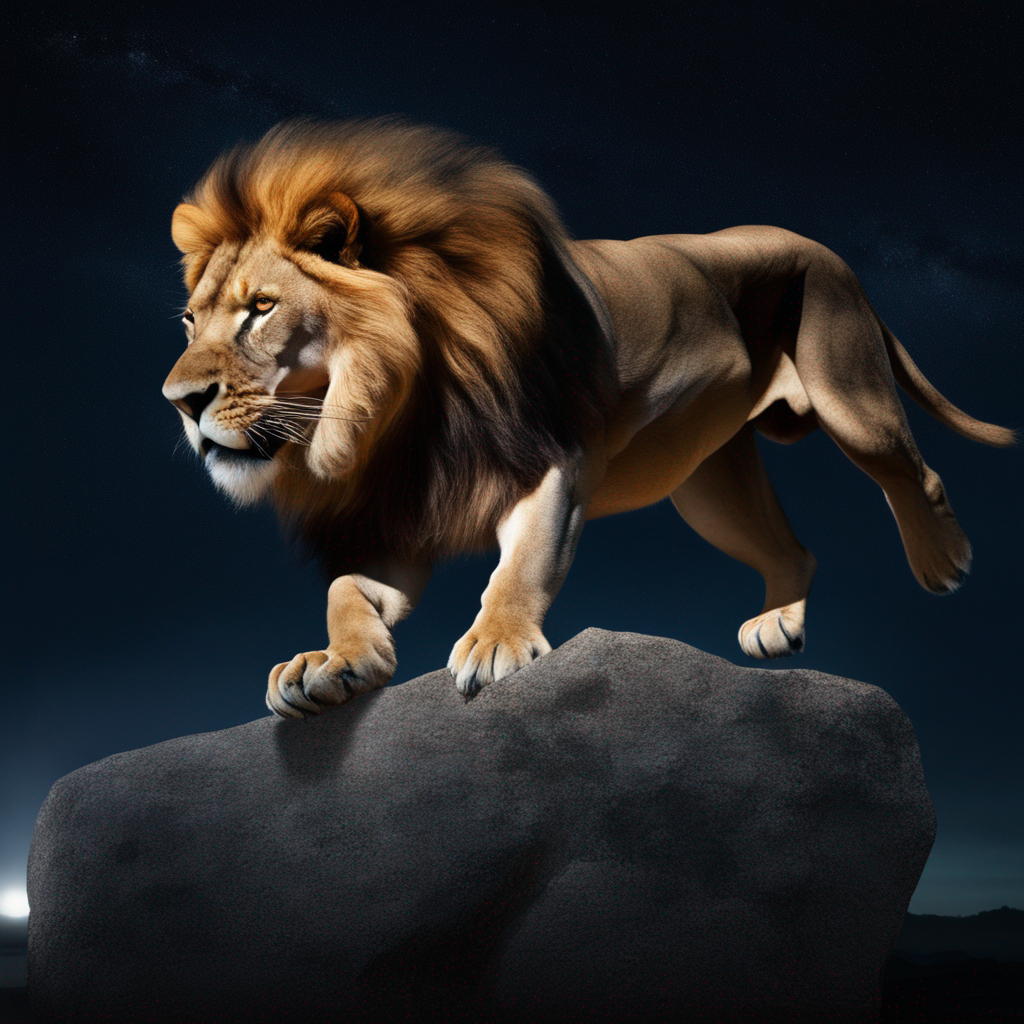
Let’s set denoising_end=0.8 so the base model performs the first 80% of denoising the high-noise timesteps and set denoising_start=0.8 so the refiner model performs the last 20% of denoising the low-noise timesteps. The base model output should be in latent space instead of a PIL image.
prompt = "A majestic lion jumping from a big stone at night"

image = base(
    prompt=prompt,
    num_inference_steps=40,
    denoising_end=0.8,
    output_type="latent",
).images
image = refiner(
    prompt=prompt,
    num_inference_steps=40,
    denoising_start=0.8,
    image=image,
).images[0]
image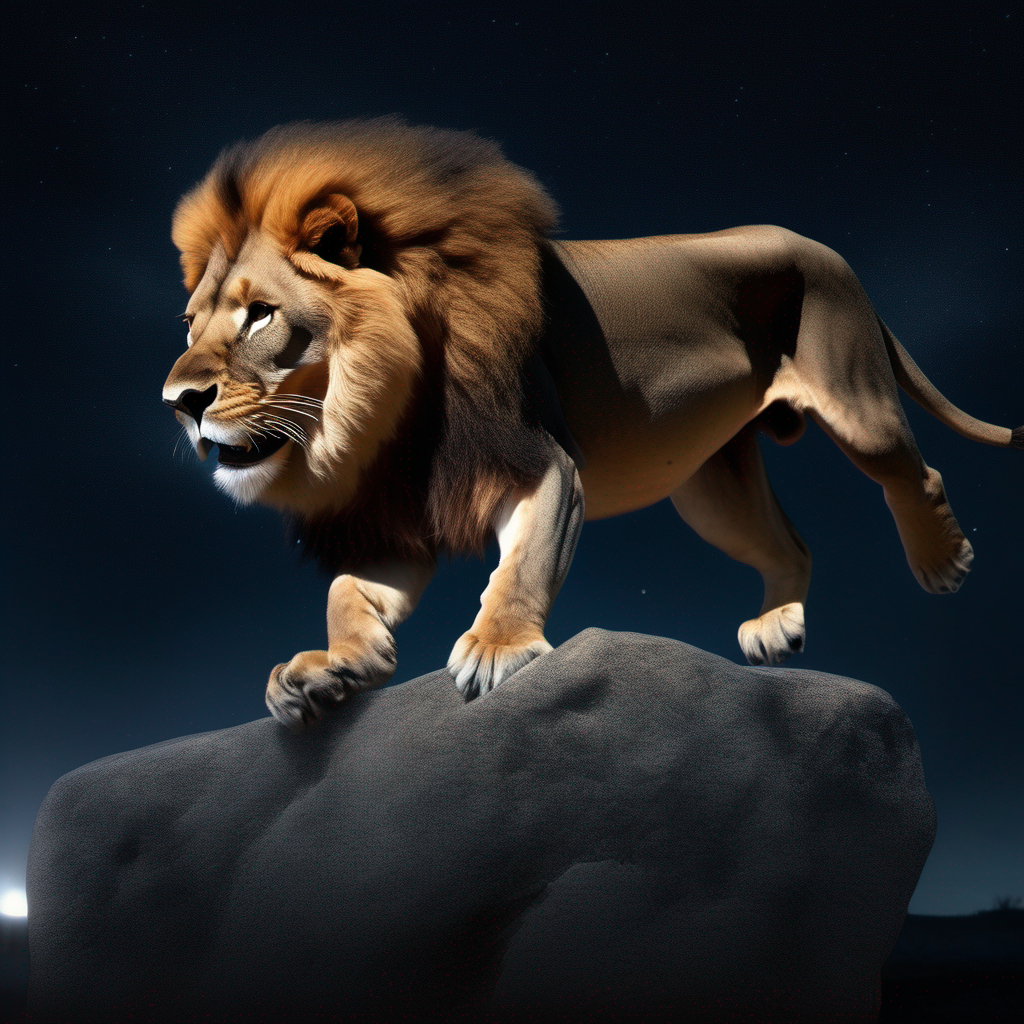
The refiner model can also be used for inpainting in the StableDiffusionXLInpaintPipeline:
from diffusers import StableDiffusionXLInpaintPipeline
from diffusers.utils import load_image, make_image_grid
import torch

base = StableDiffusionXLInpaintPipeline.from_pretrained(
    "stabilityai/stable-diffusion-xl-base-1.0", dtype=torch.float16, variant="fp16", use_safetensors=True
).to("cuda")  # or "mps", "xpu", "cpu"

refiner = StableDiffusionXLInpaintPipeline.from_pretrained(
    "stabilityai/stable-diffusion-xl-refiner-1.0",
    text_encoder_2=base.text_encoder_2,
    vae=base.vae,
    dtype=torch.float16,
    use_safetensors=True,
    variant="fp16",
).to("cuda")

img_url = "https://raw.githubusercontent.com/CompVis/latent-diffusion/main/data/inpainting_examples/overture-creations-5sI6fQgYIuo.png"
mask_url = "https://raw.githubusercontent.com/CompVis/latent-diffusion/main/data/inpainting_examples/overture-creations-5sI6fQgYIuo_mask.png"

init_image = load_image(img_url)
mask_image = load_image(mask_url)

prompt = "A majestic tiger sitting on a bench"
num_inference_steps = 75
high_noise_frac = 0.7

image = base(
    prompt=prompt,
    image=init_image,
    mask_image=mask_image,
    num_inference_steps=num_inference_steps,
    denoising_end=high_noise_frac,
    output_type="latent",
).images
image = refiner(
    prompt=prompt,
    image=image,
    mask_image=mask_image,
    num_inference_steps=num_inference_steps,
    denoising_start=high_noise_frac,
).images[0]
make_image_grid([init_image, mask_image, image.resize((512, 512))], rows=1, cols=3)
This ensemble of expert denoisers method works well for all available schedulers!
Base to refiner model
SDXL gets a boost in image quality by using the refiner model to add additional high-quality details to the fully-denoised image from the base model, in an image-to-image setting.
Load the base and refiner models:
from diffusers import DiffusionPipeline
import torch

base = DiffusionPipeline.from_pretrained(
    "stabilityai/stable-diffusion-xl-base-1.0", dtype=torch.float16, variant="fp16", use_safetensors=True
).to("cuda")  # or "mps", "xpu", "cpu"

refiner = DiffusionPipeline.from_pretrained(
    "stabilityai/stable-diffusion-xl-refiner-1.0",
    text_encoder_2=base.text_encoder_2,
    vae=base.vae,
    dtype=torch.float16,
    use_safetensors=True,
    variant="fp16",
).to("cuda")
You can use SDXL refiner with a different base model. For example, you can use the Hunyuan-DiT or PixArt-Sigma pipelines to generate images with better prompt adherence. Once you have generated an image, you can pass it to the SDXL refiner model to enhance final generation quality.
Generate an image from the base model, and set the model output to latent space:
prompt = "Astronaut in a jungle, cold color palette, muted colors, detailed, 8k"

image = base(prompt=prompt, output_type="latent").images[0]
Pass the generated image to the refiner model:
image = refiner(prompt=prompt, image=image[None, :]).images[0]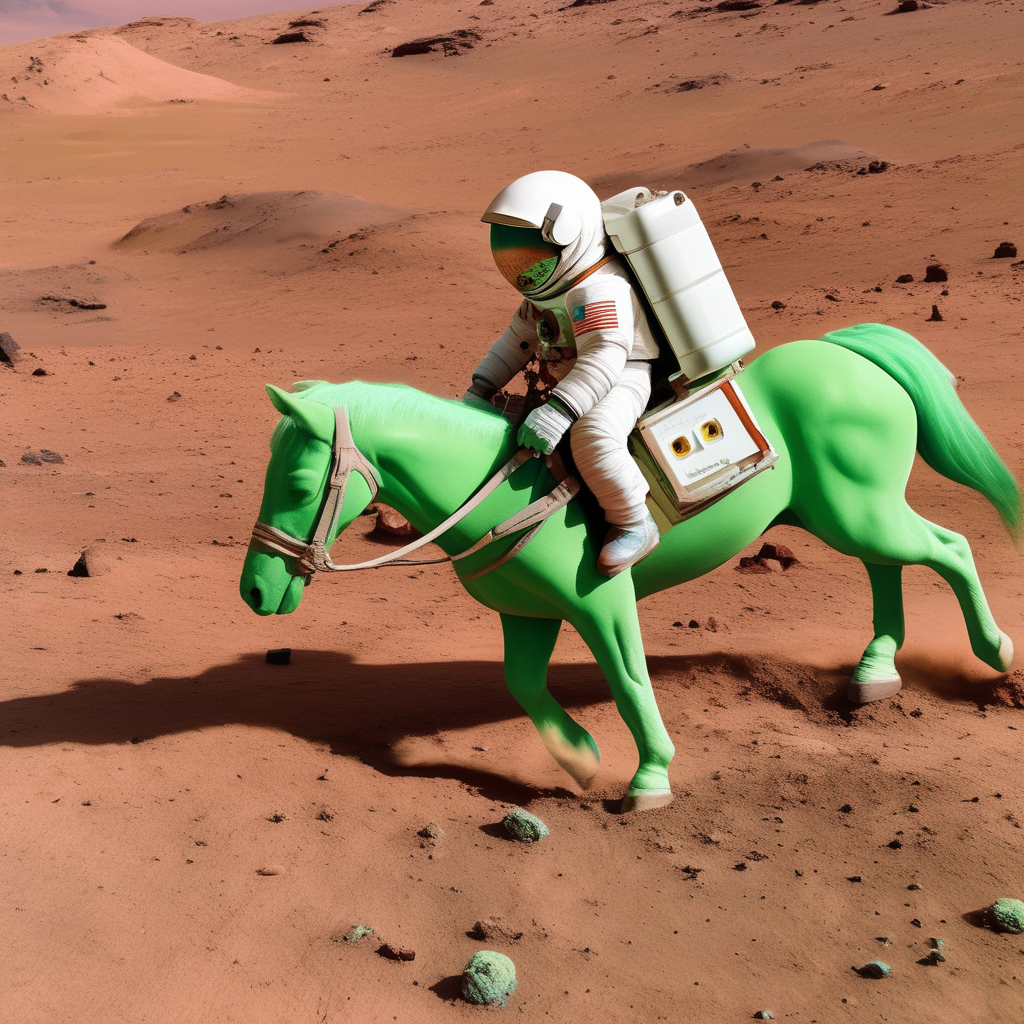
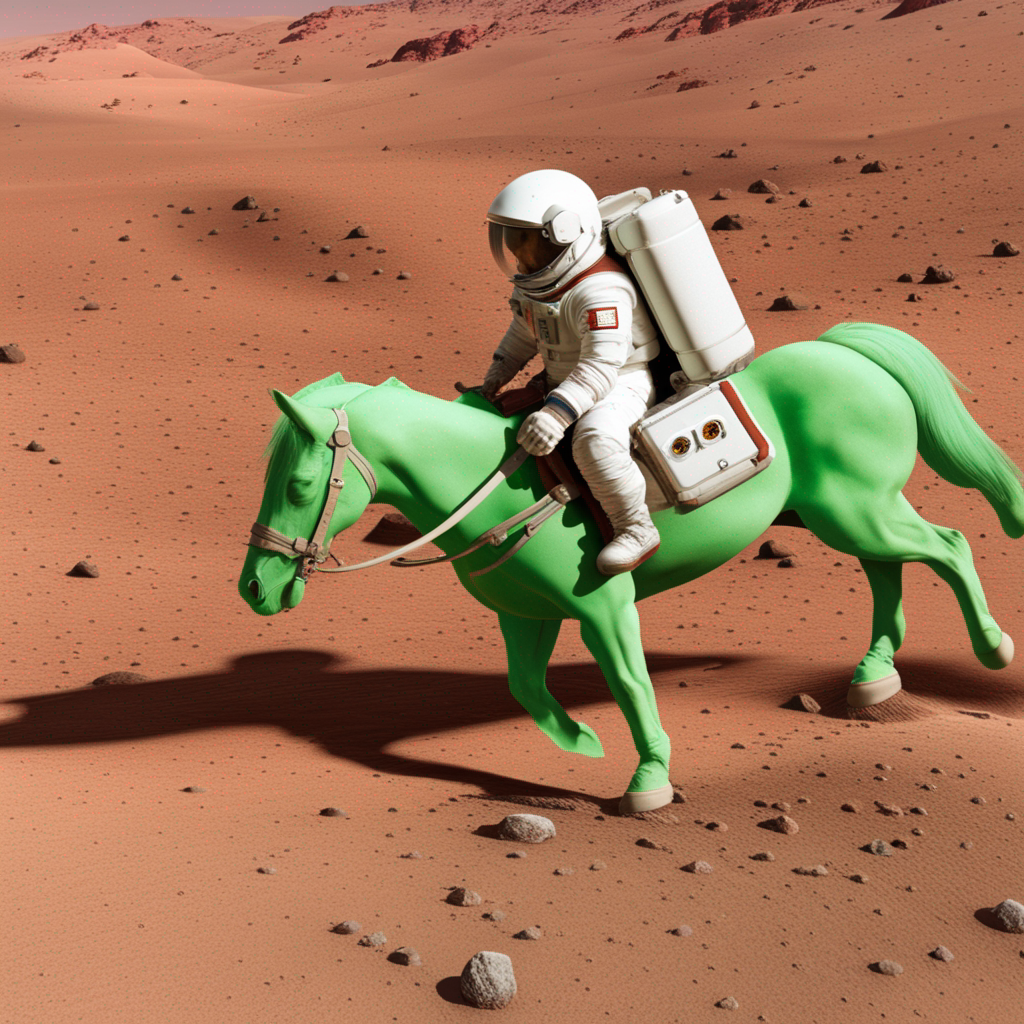
For inpainting, load the base and the refiner model in the StableDiffusionXLInpaintPipeline, remove the denoising_end and denoising_start parameters, and choose a smaller number of inference steps for the refiner.
Micro-conditioning
SDXL training involves several additional conditioning techniques, which are referred to as micro-conditioning. These include original image size, target image size, and cropping parameters. The micro-conditionings can be used at inference time to create high-quality, centered images.
You can use both micro-conditioning and negative micro-conditioning parameters thanks to classifier-free guidance. They are available in the StableDiffusionXLPipeline, StableDiffusionXLImg2ImgPipeline, StableDiffusionXLInpaintPipeline, and StableDiffusionXLControlNetPipeline.
Size conditioning
There are two types of size conditioning:
original_sizeconditioning comes from upscaled images in the training batch (because it would be wasteful to discard the smaller images which make up almost 40% of the total training data). This way, SDXL learns that upscaling artifacts are not supposed to be present in high-resolution images. During inference, you can useoriginal_sizeto indicate the original image resolution. Using the default value of(1024, 1024)produces higher-quality images that resemble the 1024x1024 images in the dataset. If you choose to use a lower resolution, such as(256, 256), the model still generates 1024x1024 images, but they’ll look like the low resolution images (simpler patterns, blurring) in the dataset.target_sizeconditioning comes from finetuning SDXL to support different image aspect ratios. During inference, if you use the default value of(1024, 1024), you’ll get an image that resembles the composition of square images in the dataset. We recommend using the same value fortarget_sizeandoriginal_size, but feel free to experiment with other options!
🤗 Diffusers also lets you specify negative conditions about an image’s size to steer generation away from certain image resolutions:
from diffusers import StableDiffusionXLPipeline
import torch

pipe = StableDiffusionXLPipeline.from_pretrained(
    "stabilityai/stable-diffusion-xl-base-1.0", dtype=torch.float16, variant="fp16", use_safetensors=True
).to("cuda")  # or "mps", "xpu", "cpu"

prompt = "Astronaut in a jungle, cold color palette, muted colors, detailed, 8k"
image = pipe(
    prompt=prompt,
    negative_original_size=(512, 512),
    negative_target_size=(1024, 1024),
).images[0]
Crop conditioning
Images generated by previous Stable Diffusion models may sometimes appear to be cropped. This is because images are actually cropped during training so that all the images in a batch have the same size. By conditioning on crop coordinates, SDXL learns that no cropping - coordinates (0, 0) - usually correlates with centered subjects and complete faces (this is the default value in 🤗 Diffusers). You can experiment with different coordinates if you want to generate off-centered compositions!
from diffusers import StableDiffusionXLPipeline
import torch

pipeline = StableDiffusionXLPipeline.from_pretrained(
    "stabilityai/stable-diffusion-xl-base-1.0", dtype=torch.float16, variant="fp16", use_safetensors=True
).to("cuda")  # or "mps", "xpu", "cpu"

prompt = "Astronaut in a jungle, cold color palette, muted colors, detailed, 8k"
image = pipeline(prompt=prompt, crops_coords_top_left=(256, 0)).images[0]
image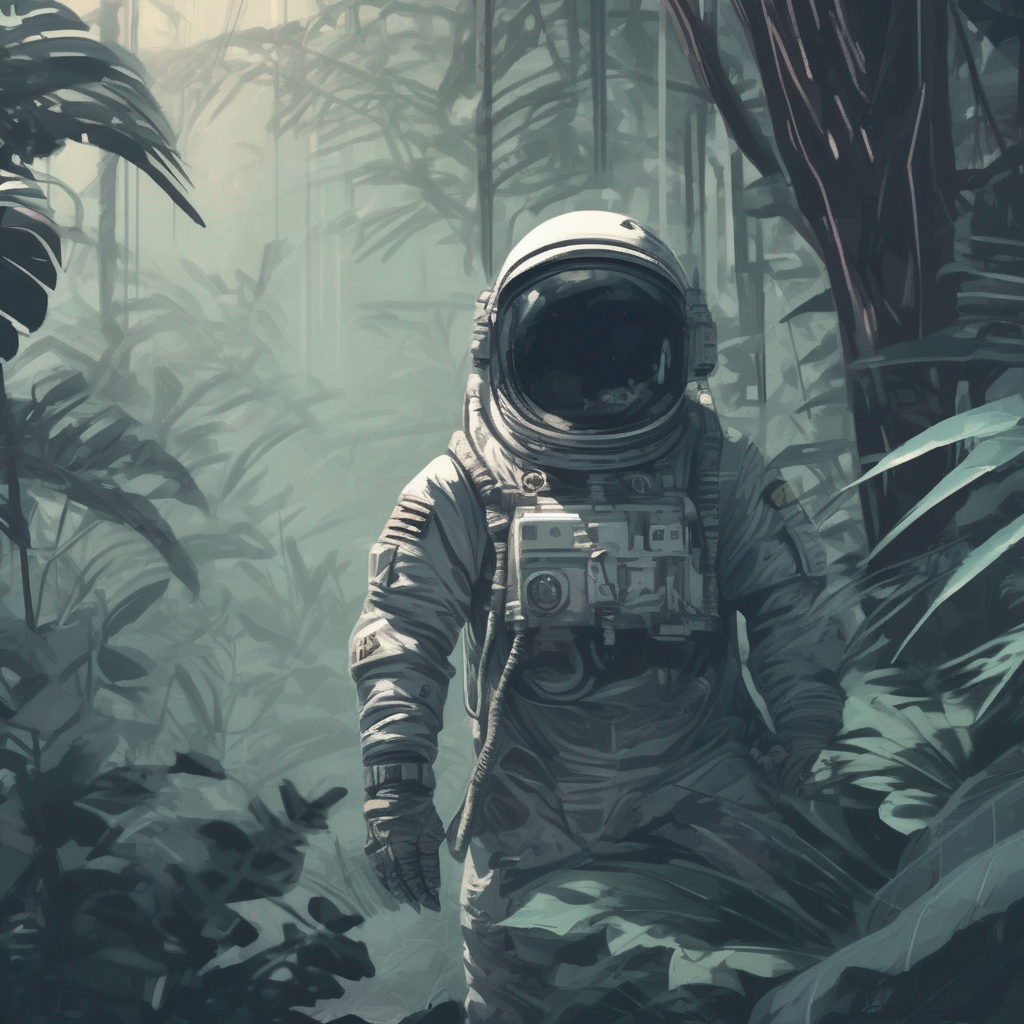
You can also specify negative cropping coordinates to steer generation away from certain cropping parameters:
from diffusers import StableDiffusionXLPipeline
import torch

pipe = StableDiffusionXLPipeline.from_pretrained(
    "stabilityai/stable-diffusion-xl-base-1.0", dtype=torch.float16, variant="fp16", use_safetensors=True
).to("cuda")  # or "mps", "xpu", "cpu"

prompt = "Astronaut in a jungle, cold color palette, muted colors, detailed, 8k"
image = pipe(
    prompt=prompt,
    negative_original_size=(512, 512),
    negative_crops_coords_top_left=(0, 0),
    negative_target_size=(1024, 1024),
).images[0]
image
Use a different prompt for each text-encoder
SDXL uses two text-encoders, so it is possible to pass a different prompt to each text-encoder, which can improve quality. Pass your original prompt to prompt and the second prompt to prompt_2 (use negative_prompt and negative_prompt_2 if you’re using negative prompts):
from diffusers import StableDiffusionXLPipeline
import torch

pipeline = StableDiffusionXLPipeline.from_pretrained(
    "stabilityai/stable-diffusion-xl-base-1.0", dtype=torch.float16, variant="fp16", use_safetensors=True
).to("cuda")  # or "mps", "xpu", "cpu"

# prompt is passed to OAI CLIP-ViT/L-14
prompt = "Astronaut in a jungle, cold color palette, muted colors, detailed, 8k"
# prompt_2 is passed to OpenCLIP-ViT/bigG-14
prompt_2 = "Van Gogh painting"
image = pipeline(prompt=prompt, prompt_2=prompt_2).images[0]
image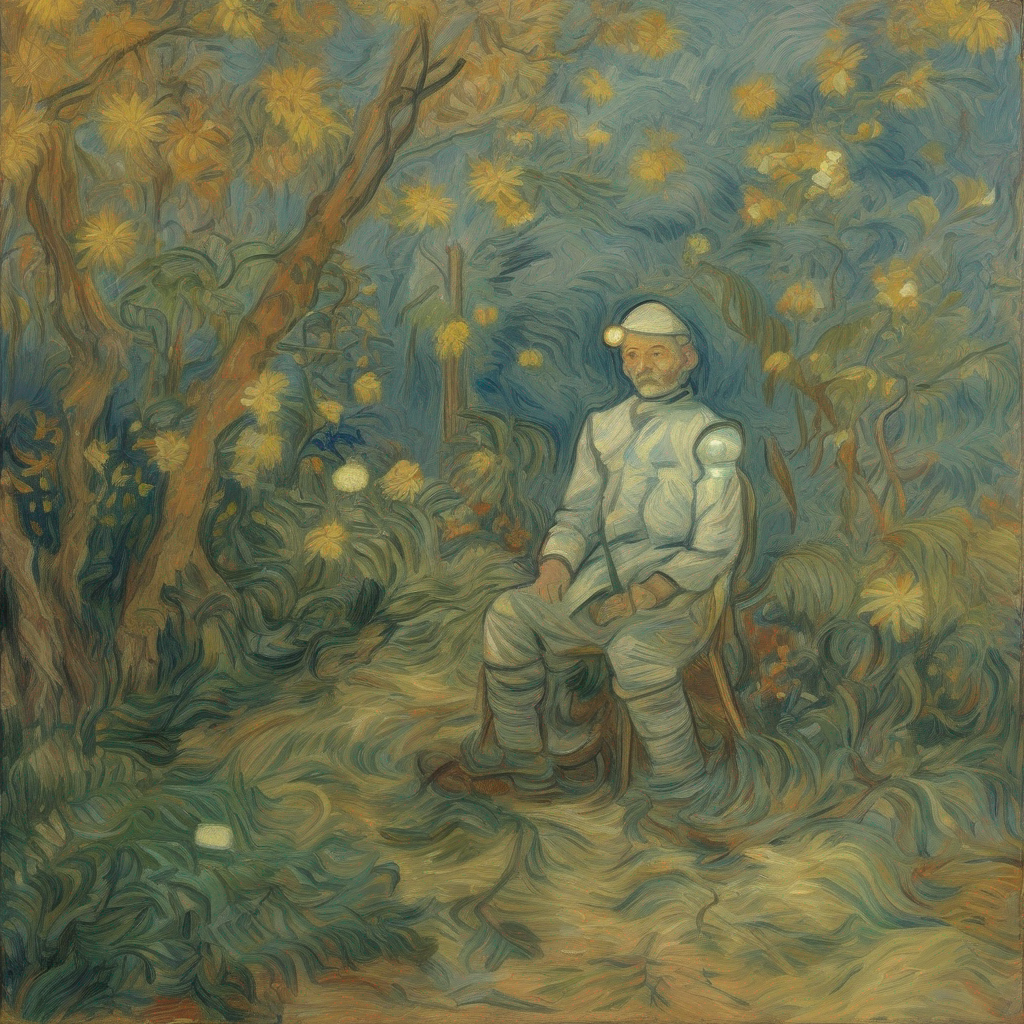
The dual text-encoders also support textual inversion embeddings that need to be loaded separately as explained in the textual inversion guide.
Optimizations
SDXL is a large model, and you may need to optimize memory to get it to run on your hardware. Here are some tips to save memory and speed up inference.
- Offload the model to the CPU with enable_model_cpu_offload() for out-of-memory errors:
- base.to("cuda")  # or "mps", "xpu", "cpu"
- refiner.to("cuda")
+ base.enable_model_cpu_offload()
+ refiner.enable_model_cpu_offload()- Use
torch.compilefor ~20% speed-up (you needtorch>=2.0):
+ base.unet = torch.compile(base.unet, mode="reduce-overhead", fullgraph=True)
+ refiner.unet = torch.compile(refiner.unet, mode="reduce-overhead", fullgraph=True)- Enable xFormers to run SDXL if
torch<2.0:
+ base.enable_xformers_memory_efficient_attention()
+ refiner.enable_xformers_memory_efficient_attention()
Resources
If you’re interested in experimenting with a minimal version of the UNet2DConditionModel used in SDXL, take a look at the minSDXL implementation which is written in PyTorch and directly compatible with 🤗 Diffusers.
StableDiffusionXLPipeline
class diffusers.StableDiffusionXLPipeline
< source >( vae: AutoencoderKLtext_encoder: CLIPTextModeltext_encoder_2: CLIPTextModelWithProjectiontokenizer: CLIPTokenizertokenizer_2: CLIPTokenizerunet: UNet2DConditionModelscheduler: KarrasDiffusionSchedulersimage_encoder: CLIPVisionModelWithProjection = Nonefeature_extractor: CLIPImageProcessorPil = Noneforce_zeros_for_empty_prompt: bool = Trueadd_watermarker: bool | None = None )
Parameters
- vae (AutoencoderKL) — Variational Auto-Encoder (VAE) Model to encode and decode images to and from latent representations.
- text_encoder (
CLIPTextModel) — Frozen text-encoder. Stable Diffusion XL uses the text portion of CLIP, specifically the clip-vit-large-patch14 variant. - text_encoder_2 (
CLIPTextModelWithProjection) — Second frozen text-encoder. Stable Diffusion XL uses the text and pool portion of CLIP, specifically the laion/CLIP-ViT-bigG-14-laion2B-39B-b160k variant. - tokenizer (
CLIPTokenizer) — Tokenizer of class CLIPTokenizer. - tokenizer_2 (
CLIPTokenizer) — Second Tokenizer of class CLIPTokenizer. - unet (UNet2DConditionModel) — Conditional U-Net architecture to denoise the encoded image latents.
- scheduler (SchedulerMixin) —
A scheduler to be used in combination with
unetto denoise the encoded image latents. Can be one of DDIMScheduler, LMSDiscreteScheduler, or PNDMScheduler. - force_zeros_for_empty_prompt (
bool, optional, defaults to"True") — Whether the negative prompt embeddings shall be forced to always be set to 0. Also see the config ofstabilityai/stable-diffusion-xl-base-1-0. - add_watermarker (
bool, optional) — Whether to use the invisible_watermark library to watermark output images. If not defined, it will default to True if the package is installed, otherwise no watermarker will be used.
Pipeline for text-to-image generation using Stable Diffusion XL.
This model inherits from DiffusionPipeline. Check the superclass documentation for the generic methods the library implements for all the pipelines (such as downloading or saving, running on a particular device, etc.)
The pipeline also inherits the following loading methods:
- load_textual_inversion() for loading textual inversion embeddings
- from_single_file() for loading
.ckptfiles - load_lora_weights() for loading LoRA weights
- save_lora_weights() for saving LoRA weights
- load_ip_adapter() for loading IP Adapters
__call__
< source >( prompt: str | list[str] = Noneprompt_2: str | list[str] | None = Noneheight: int | None = Nonewidth: int | None = Nonenum_inference_steps: int = 50timesteps: list = Nonesigmas: list = Nonedenoising_end: float | None = Noneguidance_scale: float = 5.0negative_prompt: str | list[str] | None = Nonenegative_prompt_2: str | list[str] | None = Nonenum_images_per_prompt: int | None = 1eta: float = 0.0generator: typing.Union[torch.Generator, list[torch.Generator], NoneType] = Nonelatents: typing.Optional[torch.Tensor] = Noneprompt_embeds: typing.Optional[torch.Tensor] = Nonenegative_prompt_embeds: typing.Optional[torch.Tensor] = Nonepooled_prompt_embeds: typing.Optional[torch.Tensor] = Nonenegative_pooled_prompt_embeds: typing.Optional[torch.Tensor] = Noneip_adapter_image: typing.Union[PIL.Image.Image, numpy.ndarray, torch.Tensor, list[PIL.Image.Image], list[numpy.ndarray], list[torch.Tensor], NoneType] = Noneip_adapter_image_embeds: list[torch.Tensor] | None = Noneoutput_type: str | None = 'pil'return_dict: bool = Truecross_attention_kwargs: dict[str, typing.Any] | None = Noneguidance_rescale: float = 0.0original_size: tuple[int, int] | None = Nonecrops_coords_top_left: tuple = (0, 0)target_size: tuple[int, int] | None = Nonenegative_original_size: tuple[int, int] | None = Nonenegative_crops_coords_top_left: tuple = (0, 0)negative_target_size: tuple[int, int] | None = Noneclip_skip: int | None = Nonecallback_on_step_end: typing.Union[typing.Callable[[int, int], NoneType], diffusers.callbacks.PipelineCallback, diffusers.callbacks.MultiPipelineCallbacks, NoneType] = Nonecallback_on_step_end_tensor_inputs: list = ['latents']**kwargs ) → ~pipelines.stable_diffusion_xl.StableDiffusionXLPipelineOutput or tuple
Parameters
- prompt (
strorlist[str], optional) — The prompt or prompts to guide the image generation. If not defined, one has to passprompt_embeds. instead. - prompt_2 (
strorlist[str], optional) — The prompt or prompts to be sent to thetokenizer_2andtext_encoder_2. If not defined,promptis used in both text-encoders - height (
int, optional, defaults to self.unet.config.sample_size * self.vae_scale_factor) — The height in pixels of the generated image. This is set to 1024 by default for the best results. Anything below 512 pixels won’t work well for stabilityai/stable-diffusion-xl-base-1.0 and checkpoints that are not specifically fine-tuned on low resolutions. - width (
int, optional, defaults to self.unet.config.sample_size * self.vae_scale_factor) — The width in pixels of the generated image. This is set to 1024 by default for the best results. Anything below 512 pixels won’t work well for stabilityai/stable-diffusion-xl-base-1.0 and checkpoints that are not specifically fine-tuned on low resolutions. - num_inference_steps (
int, optional, defaults to 50) — The number of denoising steps. More denoising steps usually lead to a higher quality image at the expense of slower inference. - timesteps (
list[int], optional) — Custom timesteps to use for the denoising process with schedulers which support atimestepsargument in theirset_timestepsmethod. If not defined, the default behavior whennum_inference_stepsis passed will be used. Must be in descending order. - sigmas (
list[float], optional) — Custom sigmas to use for the denoising process with schedulers which support asigmasargument in theirset_timestepsmethod. If not defined, the default behavior whennum_inference_stepsis passed will be used. - denoising_end (
float, optional) — When specified, determines the fraction (between 0.0 and 1.0) of the total denoising process to be completed before it is intentionally prematurely terminated. As a result, the returned sample will still retain a substantial amount of noise as determined by the discrete timesteps selected by the scheduler. The denoising_end parameter should ideally be utilized when this pipeline forms a part of a “Mixture of Denoisers” multi-pipeline setup, as elaborated in Refining the Image Output - guidance_scale (
float, optional, defaults to 5.0) — Guidance scale as defined in Classifier-Free Diffusion Guidance.guidance_scaleis defined aswof equation 2. of Imagen Paper. Guidance scale is enabled by settingguidance_scale > 1. Higher guidance scale encourages to generate images that are closely linked to the textprompt, usually at the expense of lower image quality. - negative_prompt (
strorlist[str], optional) — The prompt or prompts not to guide the image generation. If not defined, one has to passnegative_prompt_embedsinstead. Ignored when not using guidance (i.e., ignored ifguidance_scaleis less than1). - negative_prompt_2 (
strorlist[str], optional) — The prompt or prompts not to guide the image generation to be sent totokenizer_2andtext_encoder_2. If not defined,negative_promptis used in both text-encoders - num_images_per_prompt (
int, optional, defaults to 1) — The number of images to generate per prompt. - eta (
float, optional, defaults to 0.0) — Corresponds to parameter eta (η) in the DDIM paper: https://huggingface.co/papers/2010.02502. Only applies to schedulers.DDIMScheduler, will be ignored for others. - generator (
torch.Generatororlist[torch.Generator], optional) — One or a list of torch generator(s) to make generation deterministic. - latents (
torch.Tensor, optional) — Pre-generated noisy latents, sampled from a Gaussian distribution, to be used as inputs for image generation. Can be used to tweak the same generation with different prompts. If not provided, a latents tensor will be generated by sampling using the supplied randomgenerator. - prompt_embeds (
torch.Tensor, optional) — Pre-generated text embeddings. Can be used to easily tweak text inputs, e.g. prompt weighting. If not provided, text embeddings will be generated frompromptinput argument. - negative_prompt_embeds (
torch.Tensor, optional) — Pre-generated negative text embeddings. Can be used to easily tweak text inputs, e.g. prompt weighting. If not provided, negative_prompt_embeds will be generated fromnegative_promptinput argument. - pooled_prompt_embeds (
torch.Tensor, optional) — Pre-generated pooled text embeddings. Can be used to easily tweak text inputs, e.g. prompt weighting. If not provided, pooled text embeddings will be generated frompromptinput argument. - negative_pooled_prompt_embeds (
torch.Tensor, optional) — Pre-generated negative pooled text embeddings. Can be used to easily tweak text inputs, e.g. prompt weighting. If not provided, pooled negative_prompt_embeds will be generated fromnegative_promptinput argument. - ip_adapter_image — (
PipelineImageInput, optional): Optional image input to work with IP Adapters. - ip_adapter_image_embeds (
list[torch.Tensor], optional) — Pre-generated image embeddings for IP-Adapter. It should be a list of length same as number of IP-adapters. Each element should be a tensor of shape(batch_size, num_images, emb_dim). It should contain the negative image embedding ifdo_classifier_free_guidanceis set toTrue. If not provided, embeddings are computed from theip_adapter_imageinput argument. - output_type (
str, optional, defaults to"pil") — The output format of the generate image. Choose between PIL:PIL.Image.Imageornp.array. - return_dict (
bool, optional, defaults toTrue) — Whether or not to return a~pipelines.stable_diffusion_xl.StableDiffusionXLPipelineOutputinstead of a plain tuple. - cross_attention_kwargs (
dict, optional) — A kwargs dictionary that if specified is passed along to theAttentionProcessoras defined underself.processorin diffusers.models.attention_processor. - guidance_rescale (
float, optional, defaults to 0.0) — Guidance rescale factor proposed by Common Diffusion Noise Schedules and Sample Steps are Flawedguidance_scaleis defined asφin equation 16. of Common Diffusion Noise Schedules and Sample Steps are Flawed. Guidance rescale factor should fix overexposure when using zero terminal SNR. - original_size (
tuple[int], optional, defaults to (1024, 1024)) — Iforiginal_sizeis not the same astarget_sizethe image will appear to be down- or upsampled.original_sizedefaults to(height, width)if not specified. Part of SDXL’s micro-conditioning as explained in section 2.2 of https://huggingface.co/papers/2307.01952. - crops_coords_top_left (
tuple[int], optional, defaults to (0, 0)) —crops_coords_top_leftcan be used to generate an image that appears to be “cropped” from the positioncrops_coords_top_leftdownwards. Favorable, well-centered images are usually achieved by settingcrops_coords_top_leftto (0, 0). Part of SDXL’s micro-conditioning as explained in section 2.2 of https://huggingface.co/papers/2307.01952. - target_size (
tuple[int], optional, defaults to (1024, 1024)) — For most cases,target_sizeshould be set to the desired height and width of the generated image. If not specified it will default to(height, width). Part of SDXL’s micro-conditioning as explained in section 2.2 of https://huggingface.co/papers/2307.01952. - negative_original_size (
tuple[int], optional, defaults to (1024, 1024)) — To negatively condition the generation process based on a specific image resolution. Part of SDXL’s micro-conditioning as explained in section 2.2 of https://huggingface.co/papers/2307.01952. For more information, refer to this issue thread: https://github.com/huggingface/diffusers/issues/4208. - negative_crops_coords_top_left (
tuple[int], optional, defaults to (0, 0)) — To negatively condition the generation process based on a specific crop coordinates. Part of SDXL’s micro-conditioning as explained in section 2.2 of https://huggingface.co/papers/2307.01952. For more information, refer to this issue thread: https://github.com/huggingface/diffusers/issues/4208. - negative_target_size (
tuple[int], optional, defaults to (1024, 1024)) — To negatively condition the generation process based on a target image resolution. It should be as same as thetarget_sizefor most cases. Part of SDXL’s micro-conditioning as explained in section 2.2 of https://huggingface.co/papers/2307.01952. For more information, refer to this issue thread: https://github.com/huggingface/diffusers/issues/4208. - clip_skip (
int, optional) — Number of layers to be skipped from CLIP while computing the prompt embeddings. A value of 1 means that the output of the pre-final layer will be used for computing the prompt embeddings. - callback_on_step_end (
Callable,PipelineCallback,MultiPipelineCallbacks, optional) — A function or a subclass ofPipelineCallbackorMultiPipelineCallbacksthat is called at the end of each denoising step during the inference. with the following arguments:callback_on_step_end(self: DiffusionPipeline, step: int, timestep: int, callback_kwargs: Dict).callback_kwargswill include a list of all tensors as specified bycallback_on_step_end_tensor_inputs. - callback_on_step_end_tensor_inputs (
list, optional) — The list of tensor inputs for thecallback_on_step_endfunction. The tensors specified in the list will be passed ascallback_kwargsargument. You will only be able to include variables listed in the._callback_tensor_inputsattribute of your pipeline class.
Returns
~pipelines.stable_diffusion_xl.StableDiffusionXLPipelineOutput or tuple
~pipelines.stable_diffusion_xl.StableDiffusionXLPipelineOutput if return_dict is True, otherwise a
tuple. When returning a tuple, the first element is a list with the generated images.
Function invoked when calling the pipeline for generation.
Examples:
>>> import torch
>>> from diffusers import StableDiffusionXLPipeline

>>> pipe = StableDiffusionXLPipeline.from_pretrained(
...     "stabilityai/stable-diffusion-xl-base-1.0", torch_dtype=torch.float16
... )
>>> pipe = pipe.to("cuda")

>>> prompt = "a photo of an astronaut riding a horse on mars"
>>> image = pipe(prompt).images[0]
encode_prompt
< source >( prompt: strprompt_2: str | None = Nonedevice: typing.Optional[torch.device] = Nonenum_images_per_prompt: int = 1do_classifier_free_guidance: bool = Truenegative_prompt: str | None = Nonenegative_prompt_2: str | None = Noneprompt_embeds: typing.Optional[torch.Tensor] = Nonenegative_prompt_embeds: typing.Optional[torch.Tensor] = Nonepooled_prompt_embeds: typing.Optional[torch.Tensor] = Nonenegative_pooled_prompt_embeds: typing.Optional[torch.Tensor] = Nonelora_scale: float | None = Noneclip_skip: int | None = None )
Parameters
- prompt (
strorlist[str], optional) — prompt to be encoded - prompt_2 (
strorlist[str], optional) — The prompt or prompts to be sent to thetokenizer_2andtext_encoder_2. If not defined,promptis used in both text-encoders - device — (
torch.device): torch device - num_images_per_prompt (
int) — number of images that should be generated per prompt - do_classifier_free_guidance (
bool) — whether to use classifier free guidance or not - negative_prompt (
strorlist[str], optional) — The prompt or prompts not to guide the image generation. If not defined, one has to passnegative_prompt_embedsinstead. Ignored when not using guidance (i.e., ignored ifguidance_scaleis less than1). - negative_prompt_2 (
strorlist[str], optional) — The prompt or prompts not to guide the image generation to be sent totokenizer_2andtext_encoder_2. If not defined,negative_promptis used in both text-encoders - prompt_embeds (
torch.Tensor, optional) — Pre-generated text embeddings. Can be used to easily tweak text inputs, e.g. prompt weighting. If not provided, text embeddings will be generated frompromptinput argument. - negative_prompt_embeds (
torch.Tensor, optional) — Pre-generated negative text embeddings. Can be used to easily tweak text inputs, e.g. prompt weighting. If not provided, negative_prompt_embeds will be generated fromnegative_promptinput argument. - pooled_prompt_embeds (
torch.Tensor, optional) — Pre-generated pooled text embeddings. Can be used to easily tweak text inputs, e.g. prompt weighting. If not provided, pooled text embeddings will be generated frompromptinput argument. - negative_pooled_prompt_embeds (
torch.Tensor, optional) — Pre-generated negative pooled text embeddings. Can be used to easily tweak text inputs, e.g. prompt weighting. If not provided, pooled negative_prompt_embeds will be generated fromnegative_promptinput argument. - lora_scale (
float, optional) — A lora scale that will be applied to all LoRA layers of the text encoder if LoRA layers are loaded. - clip_skip (
int, optional) — Number of layers to be skipped from CLIP while computing the prompt embeddings. A value of 1 means that the output of the pre-final layer will be used for computing the prompt embeddings.
Encodes the prompt into text encoder hidden states.
get_guidance_scale_embedding
< source >( w: Tensorembedding_dim: int = 512dtype: dtype = torch.float32 ) → torch.Tensor
Parameters
- w (
torch.Tensor) — Generate embedding vectors with a specified guidance scale to subsequently enrich timestep embeddings. - embedding_dim (
int, optional, defaults to 512) — Dimension of the embeddings to generate. - dtype (
torch.dtype, optional, defaults totorch.float32) — Data type of the generated embeddings.
Returns
torch.Tensor
Embedding vectors with shape (len(w), embedding_dim).
StableDiffusionXLImg2ImgPipeline
class diffusers.StableDiffusionXLImg2ImgPipeline
< source >( vae: AutoencoderKLtext_encoder: CLIPTextModeltext_encoder_2: CLIPTextModelWithProjectiontokenizer: CLIPTokenizertokenizer_2: CLIPTokenizerunet: UNet2DConditionModelscheduler: KarrasDiffusionSchedulersimage_encoder: CLIPVisionModelWithProjection = Nonefeature_extractor: CLIPImageProcessorPil = Nonerequires_aesthetics_score: bool = Falseforce_zeros_for_empty_prompt: bool = Trueadd_watermarker: bool | None = None )
Parameters
- vae (AutoencoderKL) — Variational Auto-Encoder (VAE) Model to encode and decode images to and from latent representations.
- text_encoder (
CLIPTextModel) — Frozen text-encoder. Stable Diffusion XL uses the text portion of CLIP, specifically the clip-vit-large-patch14 variant. - text_encoder_2 (
CLIPTextModelWithProjection) — Second frozen text-encoder. Stable Diffusion XL uses the text and pool portion of CLIP, specifically the laion/CLIP-ViT-bigG-14-laion2B-39B-b160k variant. - tokenizer (
CLIPTokenizer) — Tokenizer of class CLIPTokenizer. - tokenizer_2 (
CLIPTokenizer) — Second Tokenizer of class CLIPTokenizer. - unet (UNet2DConditionModel) — Conditional U-Net architecture to denoise the encoded image latents.
- scheduler (SchedulerMixin) —
A scheduler to be used in combination with
unetto denoise the encoded image latents. Can be one of DDIMScheduler, LMSDiscreteScheduler, or PNDMScheduler. - requires_aesthetics_score (
bool, optional, defaults to"False") — Whether theunetrequires anaesthetic_scorecondition to be passed during inference. Also see the config ofstabilityai/stable-diffusion-xl-refiner-1-0. - force_zeros_for_empty_prompt (
bool, optional, defaults to"True") — Whether the negative prompt embeddings shall be forced to always be set to 0. Also see the config ofstabilityai/stable-diffusion-xl-base-1-0. - add_watermarker (
bool, optional) — Whether to use the invisible_watermark library to watermark output images. If not defined, it will default to True if the package is installed, otherwise no watermarker will be used.
Pipeline for text-to-image generation using Stable Diffusion XL.
This model inherits from DiffusionPipeline. Check the superclass documentation for the generic methods the library implements for all the pipelines (such as downloading or saving, running on a particular device, etc.)
The pipeline also inherits the following loading methods:
- load_textual_inversion() for loading textual inversion embeddings
- from_single_file() for loading
.ckptfiles - load_lora_weights() for loading LoRA weights
- save_lora_weights() for saving LoRA weights
- load_ip_adapter() for loading IP Adapters
__call__
< source >( prompt: str | list[str] = Noneprompt_2: str | list[str] | None = Noneimage: typing.Union[PIL.Image.Image, numpy.ndarray, torch.Tensor, list[PIL.Image.Image], list[numpy.ndarray], list[torch.Tensor]] = Nonestrength: float = 0.3num_inference_steps: int = 50timesteps: list = Nonesigmas: list = Nonedenoising_start: float | None = Nonedenoising_end: float | None = Noneguidance_scale: float = 5.0negative_prompt: str | list[str] | None = Nonenegative_prompt_2: str | list[str] | None = Nonenum_images_per_prompt: int | None = 1eta: float = 0.0generator: typing.Union[torch.Generator, list[torch.Generator], NoneType] = Nonelatents: typing.Optional[torch.Tensor] = Noneprompt_embeds: typing.Optional[torch.Tensor] = Nonenegative_prompt_embeds: typing.Optional[torch.Tensor] = Nonepooled_prompt_embeds: typing.Optional[torch.Tensor] = Nonenegative_pooled_prompt_embeds: typing.Optional[torch.Tensor] = Noneip_adapter_image: typing.Union[PIL.Image.Image, numpy.ndarray, torch.Tensor, list[PIL.Image.Image], list[numpy.ndarray], list[torch.Tensor], NoneType] = Noneip_adapter_image_embeds: list[torch.Tensor] | None = Noneoutput_type: str | None = 'pil'return_dict: bool = Truecross_attention_kwargs: dict[str, typing.Any] | None = Noneguidance_rescale: float = 0.0original_size: tuple = Nonecrops_coords_top_left: tuple = (0, 0)target_size: tuple = Nonenegative_original_size: tuple[int, int] | None = Nonenegative_crops_coords_top_left: tuple = (0, 0)negative_target_size: tuple[int, int] | None = Noneaesthetic_score: float = 6.0negative_aesthetic_score: float = 2.5clip_skip: int | None = Nonecallback_on_step_end: typing.Union[typing.Callable[[int, int], NoneType], diffusers.callbacks.PipelineCallback, diffusers.callbacks.MultiPipelineCallbacks, NoneType] = Nonecallback_on_step_end_tensor_inputs: list = ['latents']**kwargs ) → ~pipelines.stable_diffusion.StableDiffusionXLPipelineOutput or tuple
Parameters
- prompt (
strorlist[str], optional) — The prompt or prompts to guide the image generation. If not defined, one has to passprompt_embeds. instead. - prompt_2 (
strorlist[str], optional) — The prompt or prompts to be sent to thetokenizer_2andtext_encoder_2. If not defined,promptis used in both text-encoders - image (
torch.TensororPIL.Image.Imageornp.ndarrayorlist[torch.Tensor]orlist[PIL.Image.Image]orlist[np.ndarray]) — The image(s) to modify with the pipeline. - strength (
float, optional, defaults to 0.3) — Conceptually, indicates how much to transform the referenceimage. Must be between 0 and 1.imagewill be used as a starting point, adding more noise to it the larger thestrength. The number of denoising steps depends on the amount of noise initially added. Whenstrengthis 1, added noise will be maximum and the denoising process will run for the full number of iterations specified innum_inference_steps. A value of 1, therefore, essentially ignoresimage. Note that in the case ofdenoising_startbeing declared as an integer, the value ofstrengthwill be ignored. - num_inference_steps (
int, optional, defaults to 50) — The number of denoising steps. More denoising steps usually lead to a higher quality image at the expense of slower inference. - timesteps (
list[int], optional) — Custom timesteps to use for the denoising process with schedulers which support atimestepsargument in theirset_timestepsmethod. If not defined, the default behavior whennum_inference_stepsis passed will be used. Must be in descending order. - sigmas (
list[float], optional) — Custom sigmas to use for the denoising process with schedulers which support asigmasargument in theirset_timestepsmethod. If not defined, the default behavior whennum_inference_stepsis passed will be used. - denoising_start (
float, optional) — When specified, indicates the fraction (between 0.0 and 1.0) of the total denoising process to be bypassed before it is initiated. Consequently, the initial part of the denoising process is skipped and it is assumed that the passedimageis a partly denoised image. Note that when this is specified, strength will be ignored. Thedenoising_startparameter is particularly beneficial when this pipeline is integrated into a “Mixture of Denoisers” multi-pipeline setup, as detailed in Refine Image Quality. - denoising_end (
float, optional) — When specified, determines the fraction (between 0.0 and 1.0) of the total denoising process to be completed before it is intentionally prematurely terminated. As a result, the returned sample will still retain a substantial amount of noise (ca. final 20% of timesteps still needed) and should be denoised by a successor pipeline that hasdenoising_startset to 0.8 so that it only denoises the final 20% of the scheduler. The denoising_end parameter should ideally be utilized when this pipeline forms a part of a “Mixture of Denoisers” multi-pipeline setup, as elaborated in Refine Image Quality. - guidance_scale (
float, optional, defaults to 7.5) — Guidance scale as defined in Classifier-Free Diffusion Guidance.guidance_scaleis defined aswof equation 2. of Imagen Paper. Guidance scale is enabled by settingguidance_scale > 1. Higher guidance scale encourages to generate images that are closely linked to the textprompt, usually at the expense of lower image quality. - negative_prompt (
strorlist[str], optional) — The prompt or prompts not to guide the image generation. If not defined, one has to passnegative_prompt_embedsinstead. Ignored when not using guidance (i.e., ignored ifguidance_scaleis less than1). - negative_prompt_2 (
strorlist[str], optional) — The prompt or prompts not to guide the image generation to be sent totokenizer_2andtext_encoder_2. If not defined,negative_promptis used in both text-encoders - num_images_per_prompt (
int, optional, defaults to 1) — The number of images to generate per prompt. - eta (
float, optional, defaults to 0.0) — Corresponds to parameter eta (η) in the DDIM paper: https://huggingface.co/papers/2010.02502. Only applies to schedulers.DDIMScheduler, will be ignored for others. - generator (
torch.Generatororlist[torch.Generator], optional) — One or a list of torch generator(s) to make generation deterministic. - latents (
torch.Tensor, optional) — Pre-generated noisy latents, sampled from a Gaussian distribution, to be used as inputs for image generation. Can be used to tweak the same generation with different prompts. If not provided, a latents tensor will be generated by sampling using the supplied randomgenerator. - prompt_embeds (
torch.Tensor, optional) — Pre-generated text embeddings. Can be used to easily tweak text inputs, e.g. prompt weighting. If not provided, text embeddings will be generated frompromptinput argument. - negative_prompt_embeds (
torch.Tensor, optional) — Pre-generated negative text embeddings. Can be used to easily tweak text inputs, e.g. prompt weighting. If not provided, negative_prompt_embeds will be generated fromnegative_promptinput argument. - pooled_prompt_embeds (
torch.Tensor, optional) — Pre-generated pooled text embeddings. Can be used to easily tweak text inputs, e.g. prompt weighting. If not provided, pooled text embeddings will be generated frompromptinput argument. - negative_pooled_prompt_embeds (
torch.Tensor, optional) — Pre-generated negative pooled text embeddings. Can be used to easily tweak text inputs, e.g. prompt weighting. If not provided, pooled negative_prompt_embeds will be generated fromnegative_promptinput argument. - ip_adapter_image — (
PipelineImageInput, optional): Optional image input to work with IP Adapters. - ip_adapter_image_embeds (
list[torch.Tensor], optional) — Pre-generated image embeddings for IP-Adapter. It should be a list of length same as number of IP-adapters. Each element should be a tensor of shape(batch_size, num_images, emb_dim). It should contain the negative image embedding ifdo_classifier_free_guidanceis set toTrue. If not provided, embeddings are computed from theip_adapter_imageinput argument. - output_type (
str, optional, defaults to"pil") — The output format of the generate image. Choose between PIL:PIL.Image.Imageornp.array. - return_dict (
bool, optional, defaults toTrue) — Whether or not to return a~pipelines.stable_diffusion.StableDiffusionXLPipelineOutputinstead of a plain tuple. - cross_attention_kwargs (
dict, optional) — A kwargs dictionary that if specified is passed along to theAttentionProcessoras defined underself.processorin diffusers.models.attention_processor. - guidance_rescale (
float, optional, defaults to 0.0) — Guidance rescale factor proposed by Common Diffusion Noise Schedules and Sample Steps are Flawedguidance_scaleis defined asφin equation 16. of Common Diffusion Noise Schedules and Sample Steps are Flawed. Guidance rescale factor should fix overexposure when using zero terminal SNR. - original_size (
tuple[int], optional, defaults to (1024, 1024)) — Iforiginal_sizeis not the same astarget_sizethe image will appear to be down- or upsampled.original_sizedefaults to(height, width)if not specified. Part of SDXL’s micro-conditioning as explained in section 2.2 of https://huggingface.co/papers/2307.01952. - crops_coords_top_left (
tuple[int], optional, defaults to (0, 0)) —crops_coords_top_leftcan be used to generate an image that appears to be “cropped” from the positioncrops_coords_top_leftdownwards. Favorable, well-centered images are usually achieved by settingcrops_coords_top_leftto (0, 0). Part of SDXL’s micro-conditioning as explained in section 2.2 of https://huggingface.co/papers/2307.01952. - target_size (
tuple[int], optional, defaults to (1024, 1024)) — For most cases,target_sizeshould be set to the desired height and width of the generated image. If not specified it will default to(height, width). Part of SDXL’s micro-conditioning as explained in section 2.2 of https://huggingface.co/papers/2307.01952. - negative_original_size (
tuple[int], optional, defaults to (1024, 1024)) — To negatively condition the generation process based on a specific image resolution. Part of SDXL’s micro-conditioning as explained in section 2.2 of https://huggingface.co/papers/2307.01952. For more information, refer to this issue thread: https://github.com/huggingface/diffusers/issues/4208. - negative_crops_coords_top_left (
tuple[int], optional, defaults to (0, 0)) — To negatively condition the generation process based on a specific crop coordinates. Part of SDXL’s micro-conditioning as explained in section 2.2 of https://huggingface.co/papers/2307.01952. For more information, refer to this issue thread: https://github.com/huggingface/diffusers/issues/4208. - negative_target_size (
tuple[int], optional, defaults to (1024, 1024)) — To negatively condition the generation process based on a target image resolution. It should be as same as thetarget_sizefor most cases. Part of SDXL’s micro-conditioning as explained in section 2.2 of https://huggingface.co/papers/2307.01952. For more information, refer to this issue thread: https://github.com/huggingface/diffusers/issues/4208. - aesthetic_score (
float, optional, defaults to 6.0) — Used to simulate an aesthetic score of the generated image by influencing the positive text condition. Part of SDXL’s micro-conditioning as explained in section 2.2 of https://huggingface.co/papers/2307.01952. - negative_aesthetic_score (
float, optional, defaults to 2.5) — Part of SDXL’s micro-conditioning as explained in section 2.2 of https://huggingface.co/papers/2307.01952. Can be used to simulate an aesthetic score of the generated image by influencing the negative text condition. - clip_skip (
int, optional) — Number of layers to be skipped from CLIP while computing the prompt embeddings. A value of 1 means that the output of the pre-final layer will be used for computing the prompt embeddings. - callback_on_step_end (
Callable,PipelineCallback,MultiPipelineCallbacks, optional) — A function or a subclass ofPipelineCallbackorMultiPipelineCallbacksthat is called at the end of each denoising step during the inference. with the following arguments:callback_on_step_end(self: DiffusionPipeline, step: int, timestep: int, callback_kwargs: Dict).callback_kwargswill include a list of all tensors as specified bycallback_on_step_end_tensor_inputs. - callback_on_step_end_tensor_inputs (
list, optional) — The list of tensor inputs for thecallback_on_step_endfunction. The tensors specified in the list will be passed ascallback_kwargsargument. You will only be able to include variables listed in the._callback_tensor_inputsattribute of your pipeline class.
Returns
~pipelines.stable_diffusion.StableDiffusionXLPipelineOutput or tuple
~pipelines.stable_diffusion.StableDiffusionXLPipelineOutput if return_dict is True, otherwise a
`tuple. When returning a tuple, the first element is a list with the generated images.
Function invoked when calling the pipeline for generation.
Examples:
>>> import torch
>>> from diffusers import StableDiffusionXLImg2ImgPipeline
>>> from diffusers.utils import load_image

>>> pipe = StableDiffusionXLImg2ImgPipeline.from_pretrained(
...     "stabilityai/stable-diffusion-xl-refiner-1.0", torch_dtype=torch.float16
... )
>>> pipe = pipe.to("cuda")
>>> url = "https://huggingface.co/datasets/patrickvonplaten/images/resolve/main/aa_xl/000000009.png"

>>> init_image = load_image(url).convert("RGB")
>>> prompt = "a photo of an astronaut riding a horse on mars"
>>> image = pipe(prompt, image=init_image).images[0]
encode_prompt
< source >( prompt: strprompt_2: str | None = Nonedevice: typing.Optional[torch.device] = Nonenum_images_per_prompt: int = 1do_classifier_free_guidance: bool = Truenegative_prompt: str | None = Nonenegative_prompt_2: str | None = Noneprompt_embeds: typing.Optional[torch.Tensor] = Nonenegative_prompt_embeds: typing.Optional[torch.Tensor] = Nonepooled_prompt_embeds: typing.Optional[torch.Tensor] = Nonenegative_pooled_prompt_embeds: typing.Optional[torch.Tensor] = Nonelora_scale: float | None = Noneclip_skip: int | None = None )
Parameters
- prompt (
strorlist[str], optional) — prompt to be encoded - prompt_2 (
strorlist[str], optional) — The prompt or prompts to be sent to thetokenizer_2andtext_encoder_2. If not defined,promptis used in both text-encoders - device — (
torch.device): torch device - num_images_per_prompt (
int) — number of images that should be generated per prompt - do_classifier_free_guidance (
bool) — whether to use classifier free guidance or not - negative_prompt (
strorlist[str], optional) — The prompt or prompts not to guide the image generation. If not defined, one has to passnegative_prompt_embedsinstead. Ignored when not using guidance (i.e., ignored ifguidance_scaleis less than1). - negative_prompt_2 (
strorlist[str], optional) — The prompt or prompts not to guide the image generation to be sent totokenizer_2andtext_encoder_2. If not defined,negative_promptis used in both text-encoders - prompt_embeds (
torch.Tensor, optional) — Pre-generated text embeddings. Can be used to easily tweak text inputs, e.g. prompt weighting. If not provided, text embeddings will be generated frompromptinput argument. - negative_prompt_embeds (
torch.Tensor, optional) — Pre-generated negative text embeddings. Can be used to easily tweak text inputs, e.g. prompt weighting. If not provided, negative_prompt_embeds will be generated fromnegative_promptinput argument. - pooled_prompt_embeds (
torch.Tensor, optional) — Pre-generated pooled text embeddings. Can be used to easily tweak text inputs, e.g. prompt weighting. If not provided, pooled text embeddings will be generated frompromptinput argument. - negative_pooled_prompt_embeds (
torch.Tensor, optional) — Pre-generated negative pooled text embeddings. Can be used to easily tweak text inputs, e.g. prompt weighting. If not provided, pooled negative_prompt_embeds will be generated fromnegative_promptinput argument. - lora_scale (
float, optional) — A lora scale that will be applied to all LoRA layers of the text encoder if LoRA layers are loaded. - clip_skip (
int, optional) — Number of layers to be skipped from CLIP while computing the prompt embeddings. A value of 1 means that the output of the pre-final layer will be used for computing the prompt embeddings.
Encodes the prompt into text encoder hidden states.
get_guidance_scale_embedding
< source >( w: Tensorembedding_dim: int = 512dtype: dtype = torch.float32 ) → torch.Tensor
Parameters
- w (
torch.Tensor) — Generate embedding vectors with a specified guidance scale to subsequently enrich timestep embeddings. - embedding_dim (
int, optional, defaults to 512) — Dimension of the embeddings to generate. - dtype (
torch.dtype, optional, defaults totorch.float32) — Data type of the generated embeddings.
Returns
torch.Tensor
Embedding vectors with shape (len(w), embedding_dim).
StableDiffusionXLInpaintPipeline
class diffusers.StableDiffusionXLInpaintPipeline
< source >( vae: AutoencoderKLtext_encoder: CLIPTextModeltext_encoder_2: CLIPTextModelWithProjectiontokenizer: CLIPTokenizertokenizer_2: CLIPTokenizerunet: UNet2DConditionModelscheduler: KarrasDiffusionSchedulersimage_encoder: CLIPVisionModelWithProjection = Nonefeature_extractor: CLIPImageProcessorPil = Nonerequires_aesthetics_score: bool = Falseforce_zeros_for_empty_prompt: bool = Trueadd_watermarker: bool | None = None )
Parameters
- vae (AutoencoderKL) — Variational Auto-Encoder (VAE) Model to encode and decode images to and from latent representations.
- text_encoder (
CLIPTextModel) — Frozen text-encoder. Stable Diffusion XL uses the text portion of CLIP, specifically the clip-vit-large-patch14 variant. - text_encoder_2 (
CLIPTextModelWithProjection) — Second frozen text-encoder. Stable Diffusion XL uses the text and pool portion of CLIP, specifically the laion/CLIP-ViT-bigG-14-laion2B-39B-b160k variant. - tokenizer (
CLIPTokenizer) — Tokenizer of class CLIPTokenizer. - tokenizer_2 (
CLIPTokenizer) — Second Tokenizer of class CLIPTokenizer. - unet (UNet2DConditionModel) — Conditional U-Net architecture to denoise the encoded image latents.
- scheduler (SchedulerMixin) —
A scheduler to be used in combination with
unetto denoise the encoded image latents. Can be one of DDIMScheduler, LMSDiscreteScheduler, or PNDMScheduler. - requires_aesthetics_score (
bool, optional, defaults to"False") — Whether theunetrequires a aesthetic_score condition to be passed during inference. Also see the config ofstabilityai/stable-diffusion-xl-refiner-1-0. - force_zeros_for_empty_prompt (
bool, optional, defaults to"True") — Whether the negative prompt embeddings shall be forced to always be set to 0. Also see the config ofstabilityai/stable-diffusion-xl-base-1-0. - add_watermarker (
bool, optional) — Whether to use the invisible_watermark library to watermark output images. If not defined, it will default to True if the package is installed, otherwise no watermarker will be used.
Pipeline for text-to-image generation using Stable Diffusion XL.
This model inherits from DiffusionPipeline. Check the superclass documentation for the generic methods the library implements for all the pipelines (such as downloading or saving, running on a particular device, etc.)
The pipeline also inherits the following loading methods:
- load_textual_inversion() for loading textual inversion embeddings
- from_single_file() for loading
.ckptfiles - load_lora_weights() for loading LoRA weights
- save_lora_weights() for saving LoRA weights
- load_ip_adapter() for loading IP Adapters
__call__
< source >( prompt: str | list[str] = Noneprompt_2: str | list[str] | None = Noneimage: typing.Union[PIL.Image.Image, numpy.ndarray, torch.Tensor, list[PIL.Image.Image], list[numpy.ndarray], list[torch.Tensor]] = Nonemask_image: typing.Union[PIL.Image.Image, numpy.ndarray, torch.Tensor, list[PIL.Image.Image], list[numpy.ndarray], list[torch.Tensor]] = Nonemasked_image_latents: Tensor = Noneheight: int | None = Nonewidth: int | None = Nonepadding_mask_crop: int | None = Nonestrength: float = 0.9999num_inference_steps: int = 50timesteps: list = Nonesigmas: list = Nonedenoising_start: float | None = Nonedenoising_end: float | None = Noneguidance_scale: float = 7.5negative_prompt: str | list[str] | None = Nonenegative_prompt_2: str | list[str] | None = Nonenum_images_per_prompt: int | None = 1eta: float = 0.0generator: typing.Union[torch.Generator, list[torch.Generator], NoneType] = Nonelatents: typing.Optional[torch.Tensor] = Noneprompt_embeds: typing.Optional[torch.Tensor] = Nonenegative_prompt_embeds: typing.Optional[torch.Tensor] = Nonepooled_prompt_embeds: typing.Optional[torch.Tensor] = Nonenegative_pooled_prompt_embeds: typing.Optional[torch.Tensor] = Noneip_adapter_image: typing.Union[PIL.Image.Image, numpy.ndarray, torch.Tensor, list[PIL.Image.Image], list[numpy.ndarray], list[torch.Tensor], NoneType] = Noneip_adapter_image_embeds: list[torch.Tensor] | None = Noneoutput_type: str | None = 'pil'return_dict: bool = Truecross_attention_kwargs: dict[str, typing.Any] | None = Noneguidance_rescale: float = 0.0original_size: tuple = Nonecrops_coords_top_left: tuple = (0, 0)target_size: tuple = Nonenegative_original_size: tuple[int, int] | None = Nonenegative_crops_coords_top_left: tuple = (0, 0)negative_target_size: tuple[int, int] | None = Noneaesthetic_score: float = 6.0negative_aesthetic_score: float = 2.5clip_skip: int | None = Nonecallback_on_step_end: typing.Union[typing.Callable[[int, int], NoneType], diffusers.callbacks.PipelineCallback, diffusers.callbacks.MultiPipelineCallbacks, NoneType] = Nonecallback_on_step_end_tensor_inputs: list = ['latents']**kwargs ) → ~pipelines.stable_diffusion.StableDiffusionXLPipelineOutput or tuple
Parameters
- prompt (
strorlist[str], optional) — The prompt or prompts to guide the image generation. If not defined, one has to passprompt_embeds. instead. - prompt_2 (
strorlist[str], optional) — The prompt or prompts to be sent to thetokenizer_2andtext_encoder_2. If not defined,promptis used in both text-encoders - image (
PIL.Image.Image) —Image, or tensor representing an image batch which will be inpainted, i.e. parts of the image will be masked out withmask_imageand repainted according toprompt. - mask_image (
PIL.Image.Image) —Image, or tensor representing an image batch, to maskimage. White pixels in the mask will be repainted, while black pixels will be preserved. Ifmask_imageis a PIL image, it will be converted to a single channel (luminance) before use. If it’s a tensor, it should contain one color channel (L) instead of 3, so the expected shape would be(B, H, W, 1). - masked_image_latents (
torch.Tensor, optional) — Pre-encoded latent of the masked image (for inpainting). - height (
int, optional, defaults to self.unet.config.sample_size * self.vae_scale_factor) — The height in pixels of the generated image. This is set to 1024 by default for the best results. Anything below 512 pixels won’t work well for stabilityai/stable-diffusion-xl-base-1.0 and checkpoints that are not specifically fine-tuned on low resolutions. - width (
int, optional, defaults to self.unet.config.sample_size * self.vae_scale_factor) — The width in pixels of the generated image. This is set to 1024 by default for the best results. Anything below 512 pixels won’t work well for stabilityai/stable-diffusion-xl-base-1.0 and checkpoints that are not specifically fine-tuned on low resolutions. - padding_mask_crop (
int, optional, defaults toNone) — The size of margin in the crop to be applied to the image and masking. IfNone, no crop is applied to image and mask_image. Ifpadding_mask_cropis notNone, it will first find a rectangular region with the same aspect ration of the image and contains all masked area, and then expand that area based onpadding_mask_crop. The image and mask_image will then be cropped based on the expanded area before resizing to the original image size for inpainting. This is useful when the masked area is small while the image is large and contain information irrelevant for inpainting, such as background. - strength (
float, optional, defaults to 0.9999) — Conceptually, indicates how much to transform the masked portion of the referenceimage. Must be between 0 and 1.imagewill be used as a starting point, adding more noise to it the larger thestrength. The number of denoising steps depends on the amount of noise initially added. Whenstrengthis 1, added noise will be maximum and the denoising process will run for the full number of iterations specified innum_inference_steps. A value of 1, therefore, essentially ignores the masked portion of the referenceimage. Note that in the case ofdenoising_startbeing declared as an integer, the value ofstrengthwill be ignored. - num_inference_steps (
int, optional, defaults to 50) — The number of denoising steps. More denoising steps usually lead to a higher quality image at the expense of slower inference. - timesteps (
list[int], optional) — Custom timesteps to use for the denoising process with schedulers which support atimestepsargument in theirset_timestepsmethod. If not defined, the default behavior whennum_inference_stepsis passed will be used. Must be in descending order. - sigmas (
list[float], optional) — Custom sigmas to use for the denoising process with schedulers which support asigmasargument in theirset_timestepsmethod. If not defined, the default behavior whennum_inference_stepsis passed will be used. - denoising_start (
float, optional) — When specified, indicates the fraction (between 0.0 and 1.0) of the total denoising process to be bypassed before it is initiated. Consequently, the initial part of the denoising process is skipped and it is assumed that the passedimageis a partly denoised image. Note that when this is specified, strength will be ignored. Thedenoising_startparameter is particularly beneficial when this pipeline is integrated into a “Mixture of Denoisers” multi-pipeline setup, as detailed in Refining the Image Output. - denoising_end (
float, optional) — When specified, determines the fraction (between 0.0 and 1.0) of the total denoising process to be completed before it is intentionally prematurely terminated. As a result, the returned sample will still retain a substantial amount of noise (ca. final 20% of timesteps still needed) and should be denoised by a successor pipeline that hasdenoising_startset to 0.8 so that it only denoises the final 20% of the scheduler. The denoising_end parameter should ideally be utilized when this pipeline forms a part of a “Mixture of Denoisers” multi-pipeline setup, as elaborated in Refining the Image Output. - guidance_scale (
float, optional, defaults to 7.5) — Guidance scale as defined in Classifier-Free Diffusion Guidance.guidance_scaleis defined aswof equation 2. of Imagen Paper. Guidance scale is enabled by settingguidance_scale > 1. Higher guidance scale encourages to generate images that are closely linked to the textprompt, usually at the expense of lower image quality. - negative_prompt (
strorlist[str], optional) — The prompt or prompts not to guide the image generation. If not defined, one has to passnegative_prompt_embedsinstead. Ignored when not using guidance (i.e., ignored ifguidance_scaleis less than1). - negative_prompt_2 (
strorlist[str], optional) — The prompt or prompts not to guide the image generation to be sent totokenizer_2andtext_encoder_2. If not defined,negative_promptis used in both text-encoders - prompt_embeds (
torch.Tensor, optional) — Pre-generated text embeddings. Can be used to easily tweak text inputs, e.g. prompt weighting. If not provided, text embeddings will be generated frompromptinput argument. - negative_prompt_embeds (
torch.Tensor, optional) — Pre-generated negative text embeddings. Can be used to easily tweak text inputs, e.g. prompt weighting. If not provided, negative_prompt_embeds will be generated fromnegative_promptinput argument. - pooled_prompt_embeds (
torch.Tensor, optional) — Pre-generated pooled text embeddings. Can be used to easily tweak text inputs, e.g. prompt weighting. If not provided, pooled text embeddings will be generated frompromptinput argument. - negative_pooled_prompt_embeds (
torch.Tensor, optional) — Pre-generated negative pooled text embeddings. Can be used to easily tweak text inputs, e.g. prompt weighting. If not provided, pooled negative_prompt_embeds will be generated fromnegative_promptinput argument. - ip_adapter_image — (
PipelineImageInput, optional): Optional image input to work with IP Adapters. - ip_adapter_image_embeds (
list[torch.Tensor], optional) — Pre-generated image embeddings for IP-Adapter. It should be a list of length same as number of IP-adapters. Each element should be a tensor of shape(batch_size, num_images, emb_dim). It should contain the negative image embedding ifdo_classifier_free_guidanceis set toTrue. If not provided, embeddings are computed from theip_adapter_imageinput argument. - num_images_per_prompt (
int, optional, defaults to 1) — The number of images to generate per prompt. - eta (
float, optional, defaults to 0.0) — Corresponds to parameter eta (η) in the DDIM paper: https://huggingface.co/papers/2010.02502. Only applies to schedulers.DDIMScheduler, will be ignored for others. - generator (
torch.Generator, optional) — One or a list of torch generator(s) to make generation deterministic. - latents (
torch.Tensor, optional) — Pre-generated noisy latents, sampled from a Gaussian distribution, to be used as inputs for image generation. Can be used to tweak the same generation with different prompts. If not provided, a latents tensor will be generated by sampling using the supplied randomgenerator. - output_type (
str, optional, defaults to"pil") — The output format of the generate image. Choose between PIL:PIL.Image.Imageornp.array. - return_dict (
bool, optional, defaults toTrue) — Whether or not to return a StableDiffusionPipelineOutput instead of a plain tuple. - cross_attention_kwargs (
dict, optional) — A kwargs dictionary that if specified is passed along to theAttentionProcessoras defined underself.processorin diffusers.models.attention_processor. - original_size (
tuple[int], optional, defaults to (1024, 1024)) — Iforiginal_sizeis not the same astarget_sizethe image will appear to be down- or upsampled.original_sizedefaults to(height, width)if not specified. Part of SDXL’s micro-conditioning as explained in section 2.2 of https://huggingface.co/papers/2307.01952. - crops_coords_top_left (
tuple[int], optional, defaults to (0, 0)) —crops_coords_top_leftcan be used to generate an image that appears to be “cropped” from the positioncrops_coords_top_leftdownwards. Favorable, well-centered images are usually achieved by settingcrops_coords_top_leftto (0, 0). Part of SDXL’s micro-conditioning as explained in section 2.2 of https://huggingface.co/papers/2307.01952. - target_size (
tuple[int], optional, defaults to (1024, 1024)) — For most cases,target_sizeshould be set to the desired height and width of the generated image. If not specified it will default to(height, width). Part of SDXL’s micro-conditioning as explained in section 2.2 of https://huggingface.co/papers/2307.01952. - negative_original_size (
tuple[int], optional, defaults to (1024, 1024)) — To negatively condition the generation process based on a specific image resolution. Part of SDXL’s micro-conditioning as explained in section 2.2 of https://huggingface.co/papers/2307.01952. For more information, refer to this issue thread: https://github.com/huggingface/diffusers/issues/4208. - negative_crops_coords_top_left (
tuple[int], optional, defaults to (0, 0)) — To negatively condition the generation process based on a specific crop coordinates. Part of SDXL’s micro-conditioning as explained in section 2.2 of https://huggingface.co/papers/2307.01952. For more information, refer to this issue thread: https://github.com/huggingface/diffusers/issues/4208. - negative_target_size (
tuple[int], optional, defaults to (1024, 1024)) — To negatively condition the generation process based on a target image resolution. It should be as same as thetarget_sizefor most cases. Part of SDXL’s micro-conditioning as explained in section 2.2 of https://huggingface.co/papers/2307.01952. For more information, refer to this issue thread: https://github.com/huggingface/diffusers/issues/4208. - aesthetic_score (
float, optional, defaults to 6.0) — Used to simulate an aesthetic score of the generated image by influencing the positive text condition. Part of SDXL’s micro-conditioning as explained in section 2.2 of https://huggingface.co/papers/2307.01952. - negative_aesthetic_score (
float, optional, defaults to 2.5) — Part of SDXL’s micro-conditioning as explained in section 2.2 of https://huggingface.co/papers/2307.01952. Can be used to simulate an aesthetic score of the generated image by influencing the negative text condition. - guidance_rescale (
float, optional, defaults to 0.0) — Guidance rescale factor from Common Diffusion Noise Schedules and Sample Steps are Flawed. - clip_skip (
int, optional) — Number of layers to be skipped from CLIP while computing the prompt embeddings. A value of 1 means that the output of the pre-final layer will be used for computing the prompt embeddings. - callback_on_step_end (
Callable,PipelineCallback,MultiPipelineCallbacks, optional) — A function or a subclass ofPipelineCallbackorMultiPipelineCallbacksthat is called at the end of each denoising step during the inference. with the following arguments:callback_on_step_end(self: DiffusionPipeline, step: int, timestep: int, callback_kwargs: Dict).callback_kwargswill include a list of all tensors as specified bycallback_on_step_end_tensor_inputs. - callback_on_step_end_tensor_inputs (
list, optional) — The list of tensor inputs for thecallback_on_step_endfunction. The tensors specified in the list will be passed ascallback_kwargsargument. You will only be able to include variables listed in the._callback_tensor_inputsattribute of your pipeline class.
Returns
~pipelines.stable_diffusion.StableDiffusionXLPipelineOutput or tuple
~pipelines.stable_diffusion.StableDiffusionXLPipelineOutput if return_dict is True, otherwise a
tuple. tuple. When returning a tuple, the first element is a list with the generated images.
Function invoked when calling the pipeline for generation.
Examples:
>>> import torch
>>> from diffusers import StableDiffusionXLInpaintPipeline
>>> from diffusers.utils import load_image

>>> pipe = StableDiffusionXLInpaintPipeline.from_pretrained(
...     "stabilityai/stable-diffusion-xl-base-1.0",
...     torch_dtype=torch.float16,
...     variant="fp16",
...     use_safetensors=True,
... )
>>> pipe.to("cuda")

>>> img_url = "https://raw.githubusercontent.com/CompVis/latent-diffusion/main/data/inpainting_examples/overture-creations-5sI6fQgYIuo.png"
>>> mask_url = "https://raw.githubusercontent.com/CompVis/latent-diffusion/main/data/inpainting_examples/overture-creations-5sI6fQgYIuo_mask.png"

>>> init_image = load_image(img_url).convert("RGB")
>>> mask_image = load_image(mask_url).convert("RGB")

>>> prompt = "A majestic tiger sitting on a bench"
>>> image = pipe(
...     prompt=prompt, image=init_image, mask_image=mask_image, num_inference_steps=50, strength=0.80
... ).images[0]
encode_prompt
< source >( prompt: strprompt_2: str | None = Nonedevice: typing.Optional[torch.device] = Nonenum_images_per_prompt: int = 1do_classifier_free_guidance: bool = Truenegative_prompt: str | None = Nonenegative_prompt_2: str | None = Noneprompt_embeds: typing.Optional[torch.Tensor] = Nonenegative_prompt_embeds: typing.Optional[torch.Tensor] = Nonepooled_prompt_embeds: typing.Optional[torch.Tensor] = Nonenegative_pooled_prompt_embeds: typing.Optional[torch.Tensor] = Nonelora_scale: float | None = Noneclip_skip: int | None = None )
Parameters
- prompt (
strorlist[str], optional) — prompt to be encoded - prompt_2 (
strorlist[str], optional) — The prompt or prompts to be sent to thetokenizer_2andtext_encoder_2. If not defined,promptis used in both text-encoders - device — (
torch.device): torch device - num_images_per_prompt (
int) — number of images that should be generated per prompt - do_classifier_free_guidance (
bool) — whether to use classifier free guidance or not - negative_prompt (
strorlist[str], optional) — The prompt or prompts not to guide the image generation. If not defined, one has to passnegative_prompt_embedsinstead. Ignored when not using guidance (i.e., ignored ifguidance_scaleis less than1). - negative_prompt_2 (
strorlist[str], optional) — The prompt or prompts not to guide the image generation to be sent totokenizer_2andtext_encoder_2. If not defined,negative_promptis used in both text-encoders - prompt_embeds (
torch.Tensor, optional) — Pre-generated text embeddings. Can be used to easily tweak text inputs, e.g. prompt weighting. If not provided, text embeddings will be generated frompromptinput argument. - negative_prompt_embeds (
torch.Tensor, optional) — Pre-generated negative text embeddings. Can be used to easily tweak text inputs, e.g. prompt weighting. If not provided, negative_prompt_embeds will be generated fromnegative_promptinput argument. - pooled_prompt_embeds (
torch.Tensor, optional) — Pre-generated pooled text embeddings. Can be used to easily tweak text inputs, e.g. prompt weighting. If not provided, pooled text embeddings will be generated frompromptinput argument. - negative_pooled_prompt_embeds (
torch.Tensor, optional) — Pre-generated negative pooled text embeddings. Can be used to easily tweak text inputs, e.g. prompt weighting. If not provided, pooled negative_prompt_embeds will be generated fromnegative_promptinput argument. - lora_scale (
float, optional) — A lora scale that will be applied to all LoRA layers of the text encoder if LoRA layers are loaded. - clip_skip (
int, optional) — Number of layers to be skipped from CLIP while computing the prompt embeddings. A value of 1 means that the output of the pre-final layer will be used for computing the prompt embeddings.
Encodes the prompt into text encoder hidden states.
get_guidance_scale_embedding
< source >( w: Tensorembedding_dim: int = 512dtype: dtype = torch.float32 ) → torch.Tensor
Parameters
- w (
torch.Tensor) — Generate embedding vectors with a specified guidance scale to subsequently enrich timestep embeddings. - embedding_dim (
int, optional, defaults to 512) — Dimension of the embeddings to generate. - dtype (
torch.dtype, optional, defaults totorch.float32) — Data type of the generated embeddings.
Returns
torch.Tensor
Embedding vectors with shape (len(w), embedding_dim).