

Align-Anything
Collection
11 items • Updated • 4

Beaver-Vision-11B is an Image-Text-to-Text chat assistant trained based on the LLaMA-3.2-11B-Vision (pretrained version) using the Align-Anything-Instruct dataset and Align-Anything framework.
Beaver-Vision-11B aims to enhance the instruction-following abilities of MLLMs (Multi-modal Large Language Models). Compared with LLaMA-3.2-11B-Vision-Instruct, Beaver-Vision-11B uses Align-Anything-Instruct dataset and post-training alignment method, achieving better performance. More importantly, Beaver-Vision-11B has open-sourced all of its training data, code, and evaluation scripts, providing greater convenience for the community and researchers.
| Metrics | LLaMA-3.2-11B-Vision-Instruct | Beaver-Vision-11B | |
|---|---|---|---|
| LLaVA-Bench-Coco | Rating | 102.36 | 104.67 |
| LLaVA-Bench-in-the-Wild | Rating | 92.76 | 99.13 |
| POPE | Accuracy | 80.71 | 87.07 |
| Recall | 70.95 | 83.02 | |
| Precision | 88.35 | 90.46 | |
| F1 Score | 78.65 | 86.55 |
| Role | Content |
|---|---|
| User | What's the name of the restaurant serving these dishes? |
 |
|
| LLaMA-3.2-11B-Vision-Instruct | The dish in the image is from a ramen restaurant called "Ippudo." Ippudo is known for its high-quality, authentic Japanese ramen. The bowl with the distinctive design and rich broth is characteristic of their signature Ramen. |
| GPT-4o | The restaurant serving these dishes is ICHIRAN. |
| Beaver-Vision-11B | The image shows that the restaurant is ICHIRAN. Because it appears to be a ramen dish served in a traditional Japanese-style bowl with various accompaniments such as green onions and possibly some kind of meat or broth flavoring. Additionally, the presence of the ICHIRAN logo on the dishware helps identify the restaurant. |
In this example, LLaMA-3.2-11B-Vision-Instruct failed to recognize the logo text in the bowl and fell into hallucination; GPT-4o recognized accurately but did not provide more understandable information, while Beaver-Vision-11B was able to offer both accurate and detailed answers.
 |
 |
 |
|---|---|---|
promptWhat are the things I should be cautious about when I visit here? |
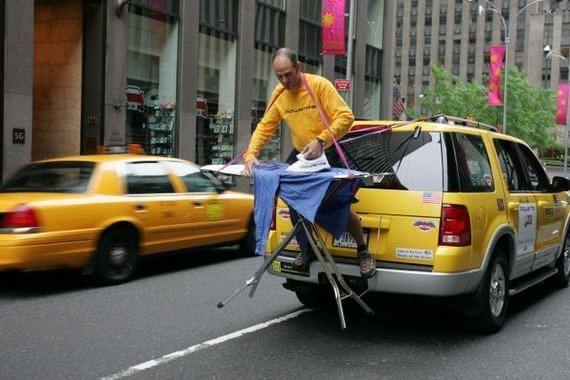
promptWhat is unusual about this image? |
promptWrite an attractive product description for this. |
responseWhen visiting a place like this, which appears to be a serene lake with a dock and surrounded by forested mountains, you should be cautious of several factors: |
responseThe unusual aspect of this image is that a person is ironing clothes on the back of a moving taxi. This is an unconventional and unsafe activity, as it involves using an electric iron in close proximity to other vehicles and potentially causing harm or damage. Additionally, the presence of the ironing board and iron on the side of a speeding vehicle defies common sense and safety protocols. |
responseClassic Mario Themed Mugs |
import requests
import torch
from PIL import Image
from transformers import MllamaForConditionalGeneration, AutoProcessor

model_id = "PKU-Alignment/Beaver-Vision-11B"

model = MllamaForConditionalGeneration.from_pretrained(
    model_id,
    torch_dtype=torch.bfloat16,
    device_map="auto",
)
processor = AutoProcessor.from_pretrained(model_id)

url = "https://huggingface.co/datasets/huggingface/documentation-images/resolve/0052a70beed5bf71b92610a43a52df6d286cd5f3/diffusers/rabbit.jpg"
image = Image.open(requests.get(url, stream=True).raw)

messages = [
    {"role": "user", "content": [
        {"type": "image"},
        {"type": "text", "text": "If I had to write a haiku for this one, it would be: "}
    ]}
]
input_text = processor.apply_chat_template(messages, add_generation_prompt=True)
inputs = processor(
    image,
    input_text,
    add_special_tokens=False,
    return_tensors="pt"
).to(model.device)

output = model.generate(**inputs, max_new_tokens=30)
print(processor.decode(output[0], skip_special_tokens=True))

# The output:
# In the garden's embrace,
# Bunny in a blue coat,
# Spring's gentle whisper.
Please cite our work if you use the data or model in your paper.
@misc{align_anything,
  author = {PKU-Alignment Team},
  title = {Align Anything: training all modality models to follow instructions with unified language feedback},
  year = {2024},
  publisher = {GitHub},
  journal = {GitHub repository},
  howpublished = {\url{https://github.com/PKU-Alignment/align-anything}},
}
Beaver-Vision-11B is released under Apache License 2.0, and you also need to agree with LLAMA 3.2 COMMUNITY LICENSE.
Base model
meta-llama/Llama-3.2-11B-Vision